By Alex
 How to Get Started With AI Agents: A Practical Step-by-Step Guide
A practical, no-hype path for getting your first AI agent live: pick one real task, decide build vs. buy, connect your actual tools, add a human checkpoint, then measure before you expand.
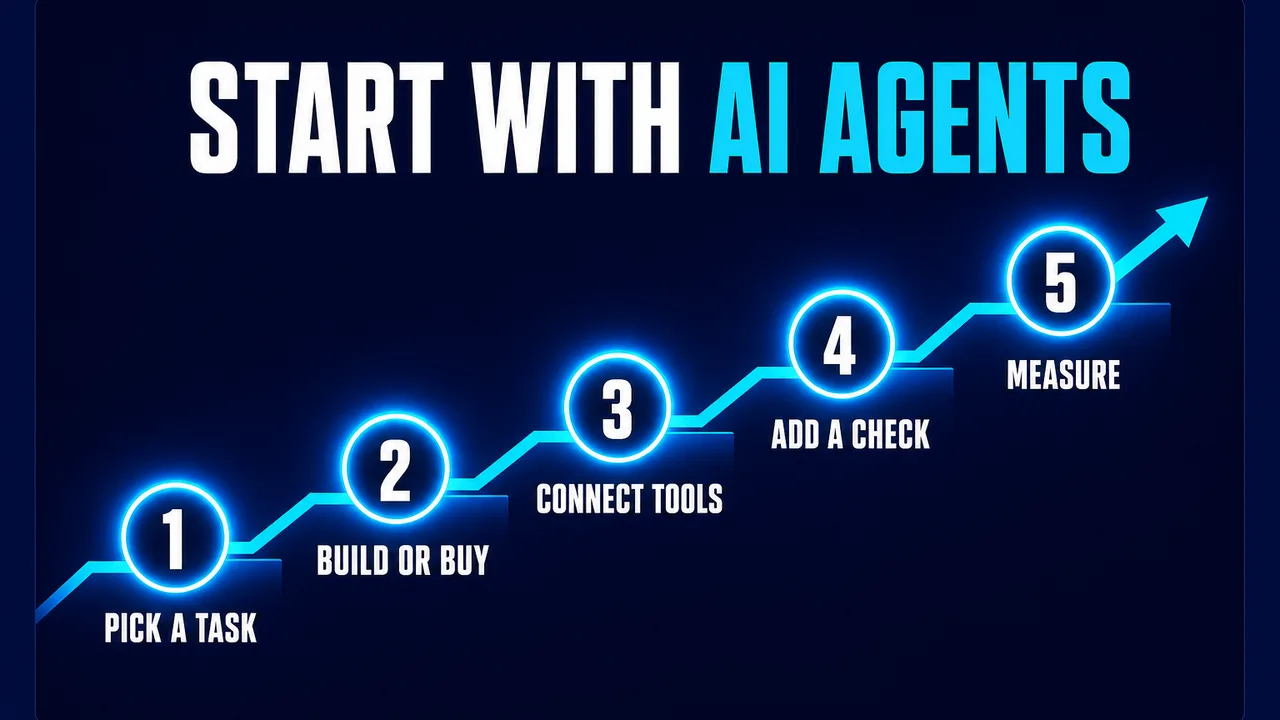
Getting started with AI agents isn't about picking the most impressive use case — it's about picking the smallest real one, and proving it works before you touch anything bigger. OpenAI's own guide to building agents makes the same point: start small, validate with real use, and grow capability over time. This guide walks through that path in five concrete steps.
Definition: Getting started with AI agents means running one real, narrow task through an AI agent end-to-end — including human review — before expanding scope.
Example: Instead of "automate our support team," a real starting point is "draft first-response replies to refund-status questions for a human to approve."
Key takeaway: The order matters — task first, tool choice second, integration third, oversight fourth, measurement fifth. Skipping ahead is the most common way this goes wrong.
Business impact: Teams that start narrow and measure the result can make a real go/no-go call on wider automation. Teams that start broad usually can't tell if it worked at all.
Step 1: Pick one real task, not a department
Start with a single task that's repetitive, already well-defined, and happens often enough to matter — something you could write clear instructions for today, even without AI. "Answer questions about our return policy" is a task. "Handle customer service" is a department. The narrower starting point is also the one you can actually evaluate: you'll know within days or weeks whether it's working, instead of guessing months later whether some broad initiative "helped."
If you're unsure where to look, the highest-value early candidates are usually tasks your team already does the same way every time — the kind covered in guides like automating customer support, lead qualification, or document processing. If several tasks look equally promising, how to choose what to automate first covers how to actually rank them instead of guessing.
Step 2: Decide build vs. buy — deliberately, not by default
This is a real decision, and most teams should start on the "buy" side of it: using an existing agent product or a no-code platform to validate the use case before investing engineering time in something custom. Existing tools — from purpose-built vertical agents to general-purpose ones like Manus — can get a first version running in days rather than weeks.
Building your own makes more sense once you have a proven, repeatable workflow with specific requirements an off-the-shelf product can't meet — tighter data control, a workflow that's genuinely unusual, or scale that changes the unit economics. The full tradeoff is covered in build vs. buy for AI agents; the short version is that this choice should follow evidence from step 1, not precede it.
Step 3: Connect it to the tools you actually use
An agent that only works inside its own chat window isn't automating anything — it needs to read and act on the systems the task actually touches: your CRM, inbox, spreadsheets, or helpdesk. This is usually the most concrete engineering step in the whole process, and it's where a lot of the real value (and real risk) sits, since this is where the agent stops being a demo and starts touching production data.
Connecting AI agents to CRM, spreadsheets and Slack covers the practical side of this step. If you want the broader picture of what components (models, orchestration, memory, tools) actually make up a working agent system before you start connecting things, the AI automation stack explained is the reference for that.
Step 4: Add a human checkpoint before the agent acts
Have a person review the agent's output before it takes a real-world action — sending a message, updating a record, closing a ticket — for at least the first stretch of real use. This isn't a permanent constraint; it's how you catch mistakes and learn where the agent actually struggles before removing the safety net. OpenAI's own guidance treats human-in-the-loop review as a core safeguard, especially early in deployment, for exactly this reason — it's standard practice, not overcaution.
As the agent's real track record on that specific task builds up, oversight can shrink accordingly: spot-checking instead of reviewing everything, then intervening only on flagged edge cases. The mistake to avoid is removing the checkpoint on a schedule instead of based on evidence the agent has actually earned it. Related reading: Can AI Agents Replace Employees? What the Research Actually Shows.
Step 5: Measure the result, then decide what's next
Before step 1, decide what number will tell you whether this worked — hours saved, error rate, turnaround time, cost per task — and measure it before the agent touches anything, so you have something real to compare against. Measuring ROI on AI automation covers how to do this properly; the short version is that a demo looking impressive and a task actually getting measurably faster or cheaper are two different things, and only one of them is a reason to expand.
If the number holds up, that's your evidence to take on a second task — not a bigger version of the first one, but the next narrow, well-defined task on your list from step 1.
The path, in order
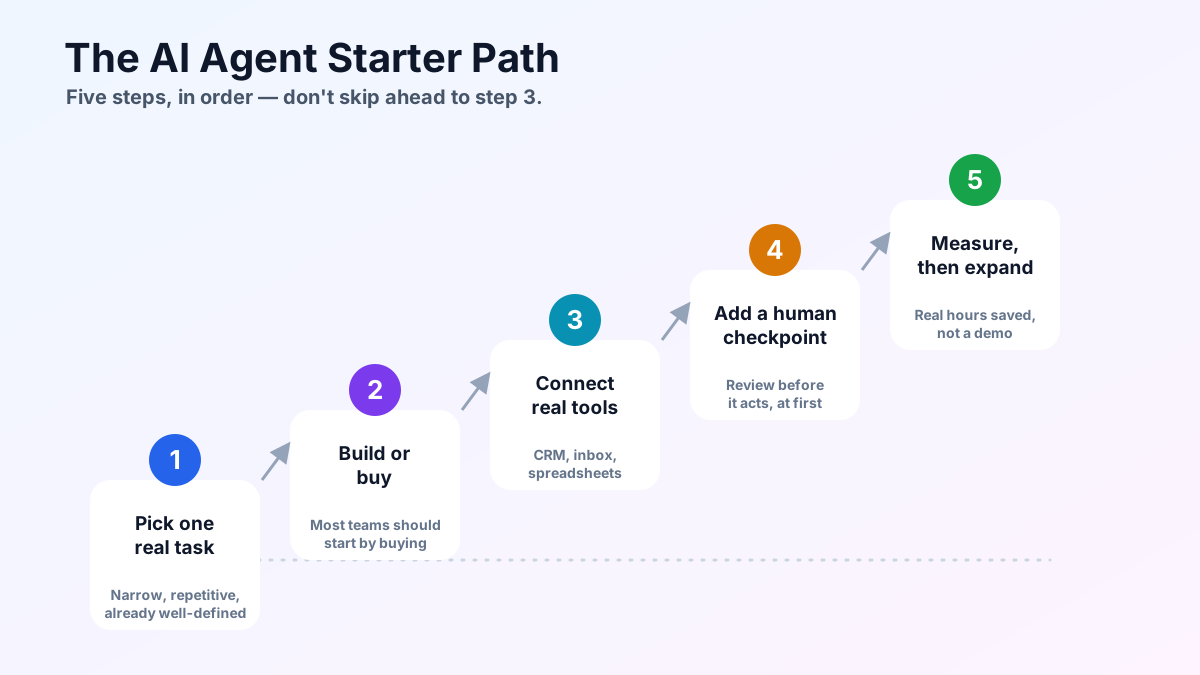
Each step depends on the one before it. Picking a tool before defining the task, or skipping the human checkpoint to move faster, are the two most common ways teams derail this process — not because the technology fails, but because the order gets skipped.
Frequently asked questions
What's the very first step to getting started with AI agents?
Pick one narrow, repetitive task that already has clear rules today — not a whole department or function. A single well-defined task (like drafting replies to a specific type of support ticket) is something an agent can actually be evaluated against. A vague goal like "automate customer service" isn't a starting point, it's a destination.
Should I build my own AI agent or buy an existing tool?
For a first attempt, buying or using an existing agent product is usually faster and lower-risk than building custom, since you can validate the use case before investing engineering time. Building in-house makes more sense once you have a proven, repeatable workflow and specific needs an off-the-shelf tool can't meet. This is a real decision worth weighing deliberately, not defaulting on.
Do I need technical/engineering skills to start using AI agents?
Not necessarily for a first use case. Many current agent products and no-code/low-code platforms are built for non-engineers to connect a trigger, an AI step, and an action. Engineering skill matters more once you're building custom agents or connecting many internal systems with specific reliability requirements.
How much human oversight does a new AI agent need?
More at the start than later. Reviewing an agent's output before it takes real-world action (sending an email, updating a record) is the standard early-stage safeguard, both to catch mistakes and to learn where the agent actually struggles. Oversight can be reduced gradually as the agent's real track record on that specific task earns it.
How do I know if my first AI agent is actually working?
Measure a real number before and after — hours spent on the task, error rate, turnaround time, or cost — rather than judging by how impressive a demo looked. If you can't measure the task today, you won't be able to tell whether the agent actually helped, so make the metric part of step one, not an afterthought.
Alex
Founder & Lead AI Writer
Alex is the founder of Yowox and lead AI writer since 2024, breaking down complex information into clear, actionable insights for thousands of readers every day. Alex has built AI automation systems for businesses since 2024, focusing on AI agents, workflow automation, and business process optimization.
Save hours. Save thousands.
Practical guides, real workflows, and the latest AI and automation news that matters — straight to your inbox.