By Alex
 Automating Document Processing With AI
How AI extracts, validates and routes data from invoices, contracts, PDFs and forms without turning every exception into manual work.
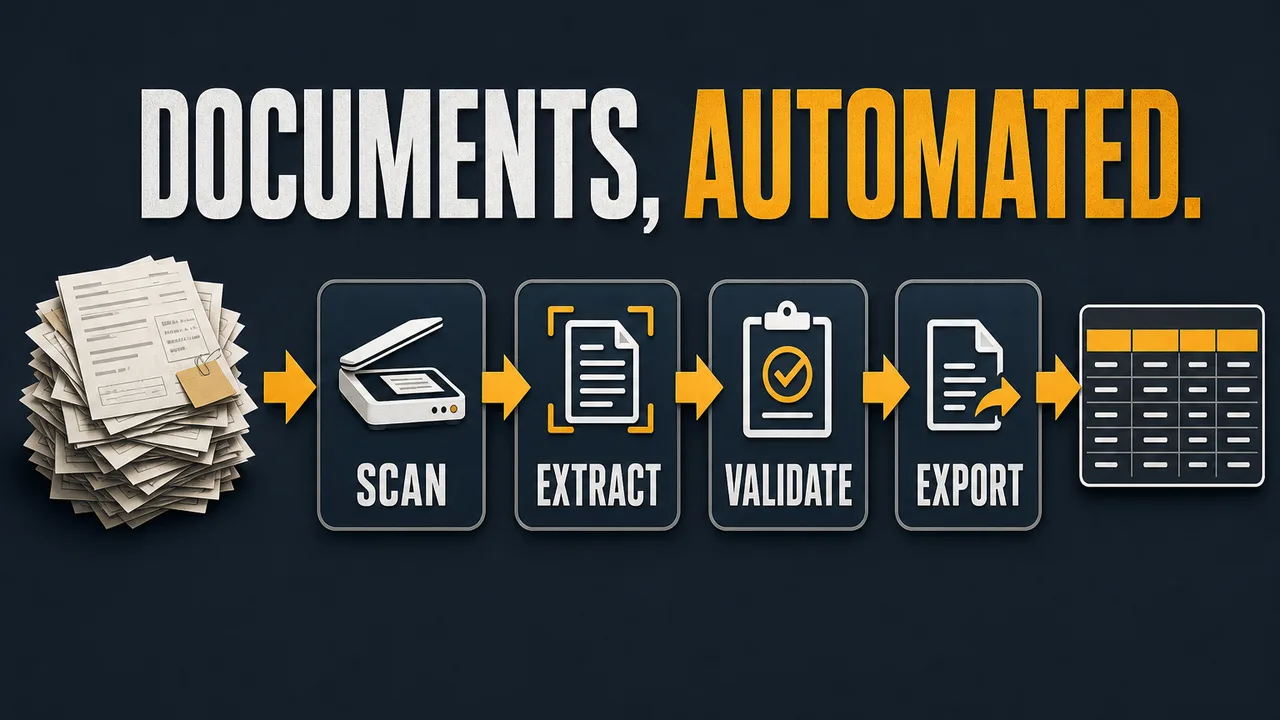
AI document processing turns invoices, contracts, forms, receipts and PDFs into structured data that a business can validate and route. The goal is not to make AI "read documents" in a demo. The goal is to remove repetitive extraction work while keeping exceptions visible and reviewable.
Definition: AI document processing uses OCR, layout understanding, extraction, validation and workflow routing to convert documents into usable structured data.
Example: An invoice workflow can extract vendor, invoice number, due date, line items and total, then validate the total before sending exceptions to accounting.
Key takeaway: Define the output fields and validation rules before choosing a model or document AI tool.
Business impact: AI document processing saves time when extracted data lands in the system where work continues, not in another file someone must copy.
What should AI document processing automate first?
AI document processing should automate one repeated document type with clear fields first. Invoices, receipts, purchase orders, intake forms and standard contracts are good candidates because the business already knows what fields matter. "Read every PDF" is not a workflow. "Extract 12 invoice fields and route exceptions to accounting" is a workflow.
Google's Document AI overview describes document workflows as moving from raw text to specific fields or entities, then classifying, splitting, parsing and integrating document metadata. That is the right mental model for a business workflow: extraction is only one layer of a document-processing system.
The Yowox Document Automation Pipeline
The Yowox Document Automation Pipeline has six stages: receive, classify, extract, validate, route and learn. Each stage prevents a common failure. Classification prevents the wrong extractor. Validation prevents bad data from entering systems. Routing prevents low-confidence documents from blocking the whole queue.
| Stage | What happens | Failure avoided |
|---|---|---|
| Receive | Capture email, upload or scan | Lost documents |
| Classify | Identify document type | Wrong extraction schema |
| Extract | Pull fields and tables | Manual retyping |
| Validate | Check totals, dates and records | Bad downstream data |
| Route | Send clean data or exception | Stalled workflow |
| Learn | Review corrections | Repeated mistakes |
Which fields should you define first?
Define the fields before choosing an AI model. For invoices, fields might include vendor name, invoice number, purchase order, due date, subtotal, tax, total, currency and line items. For contracts, fields might include parties, start date, renewal date, payment terms, termination clause and risk flags. For forms, fields might include applicant identity, contact data and required selections.
The field schema should also define the destination system. A field that nobody uses should not be extracted. A field that triggers payment, renewal or compliance action needs stronger validation. The extraction schema is a business process contract, not just a prompt.
How do OCR, extraction models and AI agents differ?
OCR reads text from the document. Extraction models identify fields, tables, key-value pairs and layout. AI agents add workflow behavior: checking another system, deciding whether a document needs review, asking for missing information or preparing the next action. Microsoft Document Intelligence lists prebuilt models for invoices, receipts, IDs, contracts and many other document types, which shows that document automation often starts with document-specific structure rather than a generic model.
Use the simplest layer that completes the job. A fixed invoice form may need OCR plus a prebuilt invoice extractor. A contract review workflow may need extraction plus an AI agent that checks renewal dates, flags risky clauses and routes the document to the right reviewer.
How should validation work?
Validation should happen before extracted data updates a live business system. Common validation rules include required fields, date format, duplicate invoice number, vendor match, subtotal plus tax equals total, currency allowed, PO exists and confidence threshold. Amazon Textract describes extraction beyond OCR for forms, tables, invoices and receipts, but the business still needs its own rules for whether extracted data is acceptable.
Validation should produce one of three outcomes: pass, review or reject. Pass means the data can move forward. Review means a human sees the extracted fields and original document. Reject means the document is unreadable, unsupported or missing required information. These outcomes are easier to operate than a vague confidence score.
How should exceptions be routed?
Exceptions should be routed with the extracted fields, the original document, the validation failure and the recommended fix. A human reviewer should not have to reopen the full workflow to understand why the document stopped. The exception queue should separate unreadable documents, missing fields, mismatched totals, unsupported layouts and policy questions.
Routing is where AI document processing becomes operational. A clean invoice can go to accounting. A missing PO can go to procurement. A risky contract clause can go to legal. A document with low extraction confidence can go to manual review. The AI system should make the next human step obvious.
Where should extracted data go?
Extracted data should go where the business already completes the process: accounting software, CRM, ERP, database, spreadsheet or ticketing system. A CSV export can be useful for a pilot, but the final workflow should avoid creating another manual copy-paste step. For integration patterns, see How to Connect AI Agents to Your CRM, Google Sheets and Slack.
The output should include metadata: document ID, source, timestamp, extraction confidence, validation result, reviewer and downstream record ID. Metadata helps debug issues later when someone asks why an invoice was paid, why a contract renewal was missed or why a form was rejected.
How do you measure document processing ROI?
Measure document processing ROI with document volume, manual minutes per document, exception rate, review time, error rate and downstream cycle time. A document workflow can look automated while still creating hidden manual review if validation is weak or extracted data lands in the wrong place.
The first target should be the easy majority. If 70% of a document type passes validation and 30% routes to review with good context, the business may already save meaningful time. The goal is not 100% autonomous processing on day one. The goal is to stop manually retyping the documents that are predictable.
Document automation works best when AI extraction is paired with validation, routing and system integration.
Frequently asked questions
What is AI document processing?
AI document processing is the use of OCR, layout understanding, extraction models, validation rules and workflow automation to turn documents into structured data. The document might be an invoice, contract, form, ID, receipt, PDF, email attachment or scanned image. The useful output is not "the AI read the document." The useful output is a validated field set routed into accounting, CRM, ERP, a spreadsheet or a review queue.
What documents are best to automate first?
The best documents to automate first are high-volume, repeated document types with stable fields and clear validation rules. Invoices, receipts, intake forms, purchase orders, claims and standard contracts are common candidates. Avoid starting with every document in the company. A narrow invoice workflow with 12 required fields is easier to test, improve and measure than a universal document automation project.
How accurate does AI document extraction need to be?
AI document extraction needs to be accurate enough for the downstream action, not perfect in isolation. A draft contract summary can tolerate human review. An invoice payment workflow needs stricter validation on vendor, invoice number, total, currency, tax and due date. The right design combines extraction confidence, business rules and exception routing. Low-confidence or high-risk documents should go to a human with extracted fields attached.
How do you validate AI-extracted document data?
Validate AI-extracted document data with required fields, date formats, duplicate checks, vendor or customer matching, totals reconciliation, currency checks, policy rules and confidence thresholds. Validation should happen before the data updates an accounting, CRM or ERP system. The goal is not to trust the model blindly. The goal is to let AI handle easy cases and route ambiguous or inconsistent documents to review.
Is document processing an AI agent workflow?
Document processing can be a simple AI extraction workflow or an AI agent workflow. A simple workflow extracts fields from a known document type and sends them to validation. An AI agent is useful when the document requires context, multiple tools, exception reasoning or follow-up actions, such as checking a vendor record, asking for a missing attachment or routing a contract clause to legal review.
Alex
Founder & Lead AI Writer
Alex is the founder of Yowox and lead AI writer since 2024, breaking down complex information into clear, actionable insights for thousands of readers every day. Alex has built AI automation systems for businesses since 2024, focusing on AI agents, workflow automation, and business process optimization.
Save hours. Save thousands.
Practical guides, real workflows, and the latest AI and automation news that matters — straight to your inbox.