By Alex
 How to Automate Customer Support With AI Agents
A practical guide to using AI agents for support triage, reply drafting, account lookup, escalation and quality control.
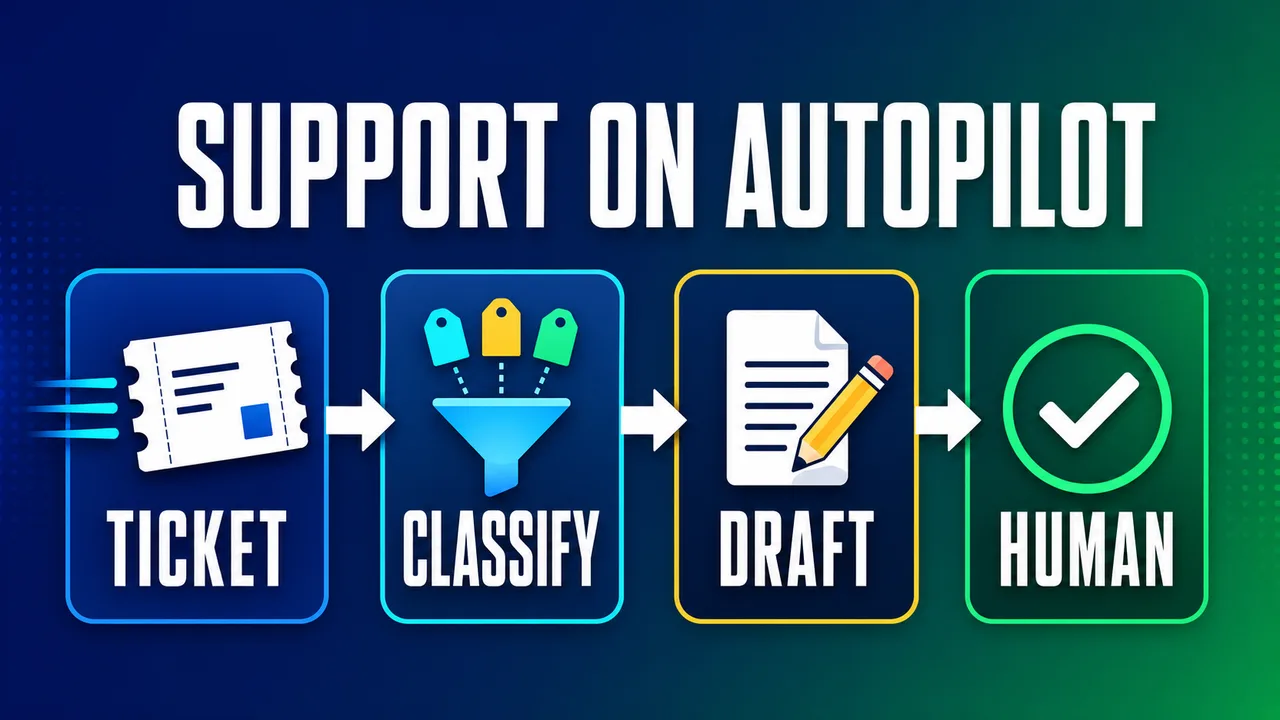
Customer support AI agents automate the repetitive first pass of support: reading a ticket, classifying intent, retrieving context, drafting the next step and escalating exceptions. The safest support automation does not start by replacing the team. The safest support automation starts by making every human support agent faster and more consistent. Retail teams usually meet the same pattern across orders, returns and retention — see AI agents for e-commerce.
Definition: A customer support AI agent is a supervised automation system that reads support requests, uses support tools, follows policy and prepares or completes the next support action.
Example: A customer support AI agent can read a refund ticket, check the order status, retrieve the return policy, draft a reply and route a low-confidence case to a human.
Key takeaway: Automate triage and drafting first; add autonomous replies only after the support AI agent proves quality on narrow, low-risk ticket types.
Business impact: A good customer support AI agent reduces manual lookup time, shortens first-response time and gives escalations better context.
What should a customer support AI agent automate first?
A customer support AI agent should automate triage first because triage is repeated, measurable and easy to keep under human control. Triage means classifying the request, detecting urgency, attaching account context, choosing the right queue and preparing the first draft. Research on large-scale support agents emphasizes evaluation, context engineering and human-in-the-loop iteration as production requirements, not optional polish; a 2026 Nubank paper on customer support agents at 100M-user scale describes these as the bridge between offline development and online impact.
The first support workflow should be narrow enough to test. "Handle all support" is too broad. "Classify inbound order-status tickets, retrieve shipping context and draft a reply for approval" is a real workflow. The second version can add refund requests, subscription changes or technical troubleshooting after the first workflow is measurable.
The Yowox Support Agent Ladder
The Yowox Support Agent Ladder is a safe rollout path for support automation: observe, classify, draft, recommend, act and escalate. Each rung gives the customer support AI agent one more responsibility only after the previous rung produces reliable results. This prevents the common mistake of jumping from chatbot demo to autonomous support without the logs, permissions and quality checks needed for production.
| Rung | Agent responsibility | Human role |
|---|---|---|
| Observe | Summarize tickets and patterns | Review insights |
| Classify | Tag intent, urgency and topic | Correct labels |
| Draft | Prepare replies from policy/context | Approve or edit |
| Recommend | Suggest next action or macro | Confirm action |
| Act | Send low-risk replies or updates | Audit samples |
| Escalate | Stop and hand off edge cases | Resolve exception |
What context does support automation need?
Support automation needs trusted context from the systems that own the facts. A customer support AI agent should not guess order status from old messages when the commerce platform has the current value. A customer support AI agent should not answer policy questions from a stale PDF when the support knowledge base is the source of truth. For a full production stack, see The AI Automation Stack: Models, Orchestration and Integrations Explained. More on this: Circles lifts telco ARPU 22% with AI personalization. Related reading: Instagram AI engagement: why human signals still matter.
The minimum context package is ticket text, customer identity, account or order data, current policy, allowed actions and escalation rules. OpenAI's function-calling documentation frames tool calls as the way a model connects to external data and actions; in support, that means the AI agent asks approved tools for order status, subscription state, CRM history or knowledge-base passages before drafting.
Which tickets can AI answer automatically?
A customer support AI agent can answer automatically only when the ticket type is low-risk, the source of truth is reliable and the allowed response is constrained. Good candidates include order status, delivery tracking, password reset guidance, basic plan questions and policy lookups with no exception request. Bad candidates include angry escalations, refund exceptions, legal threats, safety issues, billing disputes and anything that changes a customer's account without review.
Autonomy should be controlled by ticket type and confidence threshold. The first production rule can be simple: draft everything, auto-send only the narrowest category, and escalate anything that asks for an exception. This keeps the system useful without pretending every support case is safe to automate.
What should the support handoff include?
A support handoff should include the customer's issue, account context, prior attempts, relevant policy, draft recommendation and reason for escalation. The handoff is often more valuable than the draft because the next human no longer needs to reconstruct the case from scratch. Good escalation context also reduces the frustrating customer experience of repeating the same details after an AI handoff.
Use a fixed handoff schema instead of a loose summary. For example: intent, urgency, customer_status, facts_checked, policy_used, recommended_action, missing_information and reason_for_human_review. A fixed schema makes support QA easier because reviewers can see whether the AI agent missed context or chose the wrong escalation rule.
How should you measure a support AI agent?
Measure a support AI agent by completed support work, not by generated messages. Useful metrics include first-response time, resolution time, correct-routing rate, draft acceptance rate, edit distance, escalation accuracy, reopened-ticket rate and customer satisfaction. A support AI agent that writes fluent but wrong replies is worse than a simple triage system that routes cases correctly. Background: Siebel 26.6 adds RAG search for repeat support tickets.
Start with a baseline from the current process. Count ticket volume by type, manual triage time, average first-response time and common escalation reasons. After launch, compare the same numbers for the automated workflow. For choosing whether support is the best first workflow, use 7 Business Workflows You Should Automate First.
What guardrails are required before launch?
Support AI automation needs guardrails for permissions, private data, policy boundaries, approval and logging. The customer support AI agent should know which actions it can only draft, which actions it can complete, and which actions always require a human. Every tool call should be logged: what the AI agent read, what the AI agent wrote, which policy the AI agent used and why the AI agent escalated.
The simplest launch rule is "draft first, send later." Let the AI agent prepare replies and labels while humans correct the output. Use the corrections as evaluation data. Once a ticket type has enough accepted examples and low-risk failure modes, move that ticket type one rung higher on the Support Agent Ladder.
What does a first support automation project look like?
A first support automation project should cover one channel, one or two ticket types, one knowledge source and one helpdesk or CRM integration. A practical first project might classify inbound tickets, retrieve customer/order context, draft replies for shipping questions and escalate everything involving refunds. This is small enough to ship, but complete enough to prove whether AI support automation saves real time.
The best first result is not "the AI answers every customer." The best first result is a measurable reduction in manual sorting and lookup work while the team keeps quality control. When the support AI agent can read, decide, draft, act within limits and prove what happened, the support workflow is ready to expand.
Want a scoped support-agent pilot on your own tickets? Get in touch.
Frequently asked questions
What is the best first customer support workflow to automate?
The best first customer support workflow to automate is triage: classify the ticket, detect urgency, attach account context, route the issue and draft the first response. Triage is safer than fully autonomous replies because the AI agent can remove the repetitive first pass while a human still approves sensitive answers. A good first workflow has repeated ticket types, known support policies and access to the customer or order data needed to answer accurately.
Should AI agents send support replies automatically?
AI agents should usually draft support replies before they send support replies automatically. Autonomy can increase after the system proves quality on low-risk ticket types, such as order status, password resets or simple policy questions. High-risk cases should keep human approval: refunds, cancellations, angry customers, legal threats, safety issues and anything involving private account changes. Approval is a production control, not a failure of automation.
What data does a support AI agent need?
A support AI agent needs the ticket text, customer history, product or order data, support policies, knowledge-base articles, available actions and escalation rules. The most important design choice is source of truth: order status should come from the order system, subscription status from billing, and policy answers from the current support policy. Without trusted context, a support AI agent becomes a fast writer of uncertain answers.
How do you measure support AI agent quality?
Measure support AI agent quality with response acceptance rate, edit rate, escalation accuracy, first-response time, resolution time, reopened tickets and customer satisfaction. Do not measure only how many replies the AI agent drafts. A draft that needs heavy editing may save little time. The useful metric is completed support work: correct triage, useful context, fewer manual lookups and faster resolution without lowering support quality.
When should customer support stay human-only?
Customer support should stay human-only when the case is emotionally sensitive, legally risky, safety-related, high-value or outside written policy. Human-only support is also better when the system cannot access reliable context or when the business has not documented what a correct answer looks like. AI agents can still help these cases by summarizing the history and preparing a handoff, but the final decision should remain with a person.
Alex
Founder & Lead AI Writer
Alex is the founder of Yowox and lead AI writer since 2024, breaking down complex information into clear, actionable insights for thousands of readers every day. Alex has built AI automation systems for businesses since 2024, focusing on AI agents, workflow automation, and business process optimization.
Save hours. Save thousands.
Practical guides, real workflows, and the latest AI and automation news that matters — straight to your inbox.