By Alex
 What Is an AI Agent, and How Is It Different From a Chatbot?
AI agents don't just answer — they take actions, use tools and complete multi-step tasks. Here's the practical difference and why it matters for your business.
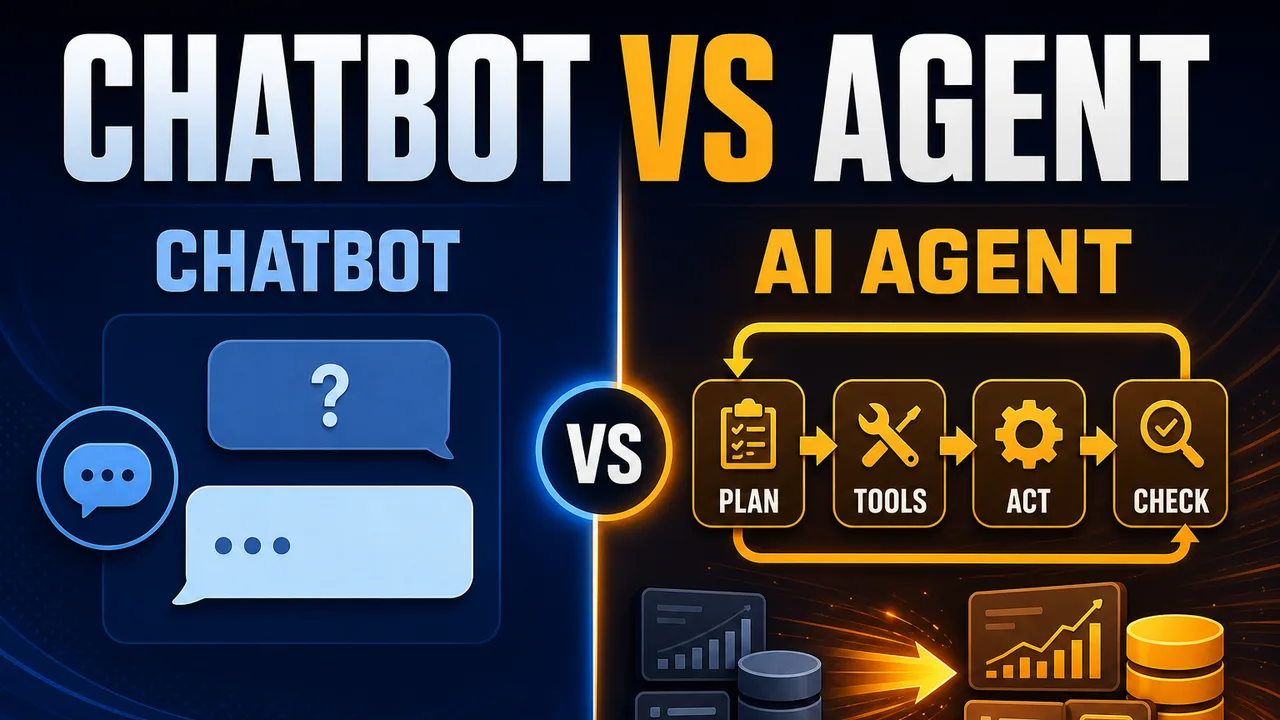
An AI agent is software that completes a multi-step task on its own — it decides what to do next, calls the tools it needs, and checks its own work. A chatbot, by contrast, only answers questions in text. That's the difference between an agent and a chatbot in one sentence; everything below unpacks what it means for your business. Letting such software act across the open web raises unsolved questions of identity and permission, which is the problem Vint Cerf is working on.
Definition: An AI agent is software built around a goal — it plans a sequence of steps, calls real tools (a CRM, a database, an email API), and checks its own result, instead of just replying with text like a chatbot.
Example: Ask an AI agent "what's the status of order #1024?" and it looks up the order, checks the shipping API, emails the customer, and logs the update in your CRM — no human step required.
Key takeaway: A chatbot answers a question; an AI agent finishes the task behind it.
Business impact: Every repetitive, rules-based workflow an AI agent takes over is time your team stops spending on it, every week, not just once.
What is an AI agent?
An AI agent is a program built around a goal, not a script. Give an AI agent a goal like "resolve this support ticket" and it plans a sequence of steps, calls whatever tools it needs (a CRM, a database, an email API), acts on the results, and checks whether the goal was actually met — retrying or escalating if not. This loop separates an AI agent from a fixed automation: a traditional workflow always runs the same steps in the same order, while an AI agent decides its own steps based on what it finds. Background: What is Manus, the agent Meta tried to buy for $2B?. More on this: Microsoft's Five-Step Guide to Building AI Agents.
AI agent vs. chatbot: the core difference
A chatbot maps a question to a reply — nothing more. Ask a chatbot something and it responds with text; it has no memory of your business systems and can't take an action beyond talking. An AI agent is built to accomplish a goal, not just answer a question: it can call tools and APIs, read and write real data, and retry when something fails. For a business, the practical consequence is this: a chatbot can deflect a question, but only an AI agent can close out the underlying task.
| Chatbot | AI Agent | |
|---|---|---|
| Response | Replies with text | Takes action |
| Tools / APIs | None | Calls real tools (CRM, database, email) |
| Memory | None | Holds context across the task |
| Steps | Single-step | Multi-step |
| Verification | None | Checks its own result before finishing |
The Yowox Agent Loop: how an AI agent actually works
Most AI agents — ours included — run the same five-step loop, whatever the task:
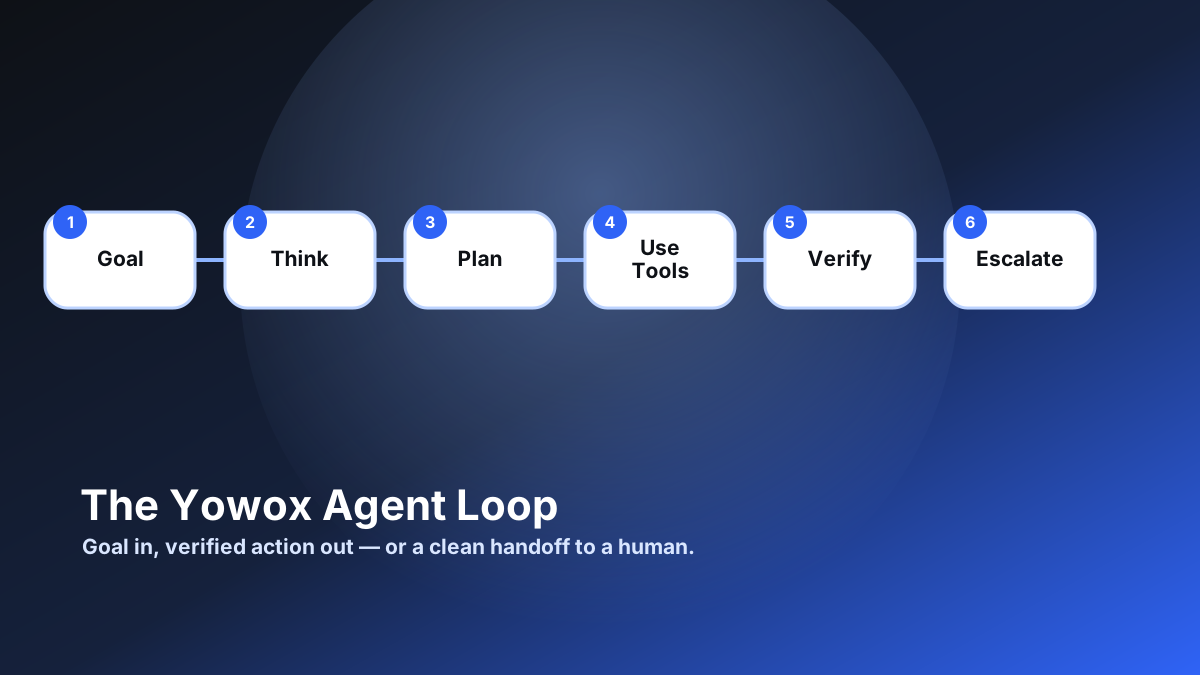
- Think — an LLM (large language model) reasons about the goal within its context window: the request, the relevant history, and any rules it must follow. See the AI automation stack for how the model layer fits with everything else.
- Plan — the AI agent breaks the goal into an ordered sequence of steps (this is often called agentic planning).
- Use Tools — the AI agent calls the tools each step needs — a CRM, a database, an email API — through function calling (also called tool use). More advanced AI agents pull in fresh knowledge with RAG (Retrieval-Augmented Generation) or connect to tools through MCP (Model Context Protocol), a standard way for an agent to reach external systems.
- Verify — the AI agent checks its result against the original goal.
- Escalate — if verification fails or the case falls outside what the AI agent is trusted to handle alone, it hands off to a human instead of guessing.
A chatbot skips this loop entirely — it stops after generating a reply, with no "verify" or "escalate" step and nothing left to act on. Larger projects sometimes split a goal across a multi-agent system, where several specialized AI agents each own one part of the loop and coordinate on the result — the broader category people mean by "agentic AI."
AI agent architecture: what's actually connected
The Yowox Agent Loop describes the behavior. Underneath it, an AI agent is a small chain of real components: a user request comes in, an LLM reasons about it, a planner turns that reasoning into ordered steps, a memory layer holds context across the task, and a tool router calls out to whatever systems the task needs (a CRM, a database, email) before a verification step checks the result.
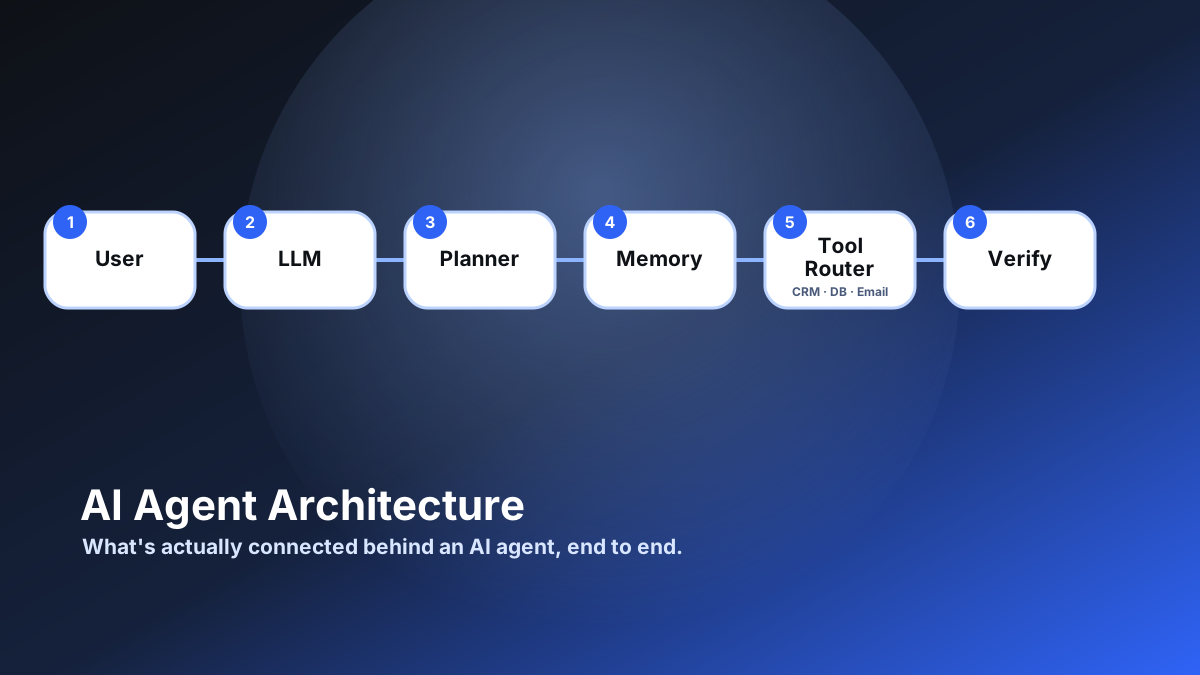
None of these components is exotic on its own — the value is in how they're wired together for one specific business process, which is exactly what changes between a generic AI agent and one that actually finishes your support tickets or your order lookups.
AI agent vs. workflow automation (n8n, Zapier, Make)
Workflow automation tools like n8n, Zapier, and Make run a fixed sequence someone configured in advance: trigger A always leads to steps B, C, D, in that order, every time. An AI agent decides its own steps at run time based on what it finds — it can take a different path for a straightforward ticket than for an unusual one, without a human pre-building a branch for every case. In practice, the two combine well: a workflow tool often triggers an AI agent, and an AI agent often calls a workflow tool as one of its steps. See 7 business workflows you should automate first for where a fixed workflow is the better (cheaper, simpler) choice on its own. Background: What Should I Learn First to Build AI Agents? A Practical Learning Roadmap. More on this: lessonweaver Turns AI Agent Mistakes into Reviewed Skills.
Three levels of AI agent autonomy
Not every AI agent should run unsupervised. In practice, an AI agent fits one of three autonomy levels:
- Assisted — the AI agent drafts the action (an email, a database update); a human approves before it goes out.
- Supervised — the AI agent acts on its own, but flags any case outside its confidence threshold for human review.
- Autonomous — the AI agent acts and reports after the fact; no per-task human step.
Most businesses should start a new AI agent at Assisted or Supervised, and only move it to Autonomous once its error rate on real cases has been measured and found acceptable.
A concrete example: order status lookup
Ask a chatbot "What's the status of order #1024?" and, at best, it explains where a human could look it up. Ask the same question to an AI agent wired into your order system: it looks up the order, checks the shipping provider's API for the current status, drafts a status update email to the customer, sends it, and logs the interaction in your CRM — then reports back that it's done. Same question, one text reply versus one completed task.
Why the ROI is different, not just the tech
A chatbot's value is bounded by how many questions it can deflect from a human agent. An AI agent's value is bounded by how many manual steps it removes — usually a bigger number. Take a support team handling 200 repetitive tickets a week at roughly 4 minutes of manual handling each: that's about 13 hours of manual work weekly on tickets a well-scoped AI agent could resolve end-to-end. A chatbot deflecting the same volume still leaves the lookup, the update, and the logging to a human; an AI agent removes all three steps, not just the first one.
Which AI agent should you build first?
Pick a process with three properties: it's repetitive, it's rules-heavy, and its inputs and outputs are clear. Support ticket triage, lead qualification, and document processing are common first choices for exactly that reason. Start with one narrow AI agent, measure the hours it actually saves after a few weeks of real use, then expand its scope or add a second one.
Once you've picked a process, the next decision is usually whether to build a custom AI agent or buy an off-the-shelf tool — it depends mainly on how standard that specific workflow is versus how much it's a source of real advantage for your business. See Build vs. Buy: Custom AI Agents or Off-the-Shelf Tools? for the full decision guide.
Want help scoping your first AI agent? Get in touch.
Frequently asked questions
Is an AI agent just a more advanced chatbot?
No — an AI agent and a chatbot solve different problems. A chatbot maps a question to a text reply and stops there. An AI agent is built to complete a goal: it plans a sequence of steps, calls tools like a CRM or database, takes real actions, and checks whether the goal was actually met before reporting back. A business can use a chatbot to answer FAQs, but only an AI agent can look up an order, update a record, and send a confirmation email as one completed task.
What tools does an AI agent need to actually do its job?
An AI agent needs access to whatever systems the task touches — commonly a CRM, a database, an email or messaging API, and sometimes a calendar or a specific internal tool. Each connection is a "tool" the AI agent can call during its Think-Plan-Use Tools loop. Without at least one real tool connection, an AI agent can only reason about a task in text, the same as a chatbot; tool access is what lets it actually complete the task instead of just describing it.
Should a new AI agent run fully autonomously from day one?
No. Most businesses should start an AI agent at the Assisted or Supervised autonomy level — where a human approves its actions or reviews flagged exceptions — before moving it to fully Autonomous. Autonomous should only follow once the AI agent's error rate has been measured on real cases and found acceptable for that specific process. Skipping straight to Autonomous on an unproven AI agent risks it acting confidently on a wrong plan with nobody catching it.
What's the easiest first AI agent for a business to build?
The easiest first AI agent targets a process that is repetitive, rules-heavy, and has clear inputs and outputs — support ticket triage, lead qualification, or document processing are common starting points. These processes give an AI agent a narrow, well-defined goal and a small set of tools to call, which makes both building and verifying it straightforward, and makes it easy to measure the actual hours saved before expanding its scope.
Can an AI agent replace a human employee?
An AI agent is best understood as removing a specific workflow, not replacing a role wholesale. A support AI agent might resolve 200 repetitive tickets a week end-to-end, freeing the human team to handle the harder, non-repetitive cases those tickets used to crowd out. In practice, most businesses run an AI agent at the Supervised level, where it acts but flags edge cases for a human — meaning the AI agent changes what the team spends time on, rather than eliminating the team.
How much does an AI agent cost to build?
Cost depends mainly on three things: how many tools the AI agent needs to connect to (a single CRM is cheaper than five systems), how much verification and error-handling the process requires, and whether it runs Assisted, Supervised, or Autonomous. A narrow AI agent covering one workflow is a much smaller project than one covering an entire department. The fastest way to get a real number is to scope one specific process rather than "an AI agent" in the abstract — get in touch for a quote based on your actual workflow.
Alex
Founder & Lead AI Writer
Alex is the founder of Yowox and lead AI writer since 2024, breaking down complex information into clear, actionable insights for thousands of readers every day. Alex has built AI automation systems for businesses since 2024, focusing on AI agents, workflow automation, and business process optimization.
Save hours. Save thousands.
Practical guides, real workflows, and the latest AI and automation news that matters — straight to your inbox.