By Alex
 Grok Bot Tutorial: Build a Cross-App AI Team
The Rundown guide shows how to set up Grok Bot, connect work apps, build a focused team of agents, and turn the first handoff into a repeatable report.
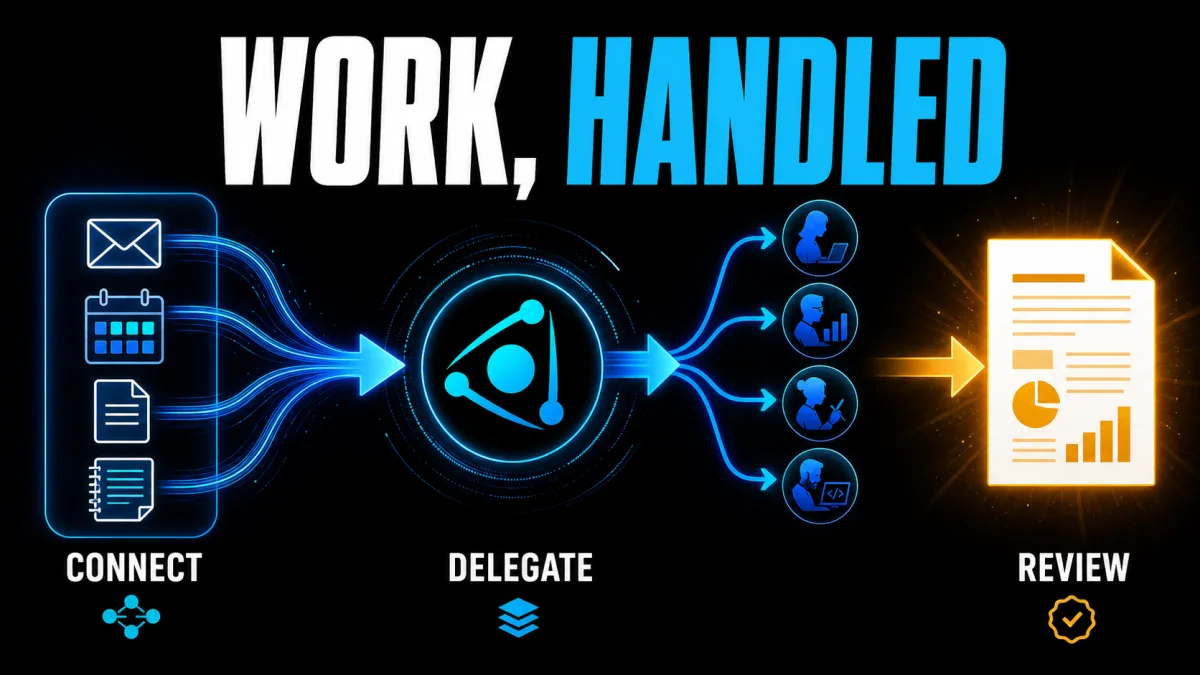
Grok Bot can be set up as a small team that moves work between connected apps instead of acting as one general chat. The The Rundown guide describes a five-step path from first login to a finished report: create a coordinating Chief of Staff, connect the work systems that matter, add focused agents, and ask the team for a concrete deliverable. The practical takeaway is to start with one inspectable handoff, not an attempt to automate every process at once.
Definition: Grok Bot is a persistent, named AI teammate that can work with apps and websites through a cloud computer; a Grok Bot team uses multiple focused teammates with a coordinating role.
Example: A Chief of Staff can review the connected work context, suggest agents for inbox, writing, sales, or newsletter work, and combine their contributions into one report.
Key takeaway: The first Grok Bot workflow should end in a file, report, draft, or other result that a person can check.
Business impact: A clear handoff reduces the coordination burden on an operator, while explicit review points keep cross-app automation from becoming an unbounded permission grant.
What is the Grok Bot setup flow?
The Grok Bot setup flow is a five-stage sequence: install and sign in, create a first Bot, add the relevant apps, ask the Chief of Staff to propose a team, and request a first deliverable. The sequence comes from The Rundown tutorial, while xAI's current Grok Bot getting-started documentation separately confirms the core setup pattern of installing the desktop app, signing in, creating a Bot, giving it a first task, authenticating tools, and reviewing the result. Use the stages as a checklist, but verify current access and connector availability before committing to a workflow.
How do you start Grok Bot and create the first Bot?
Starting Grok Bot means installing the desktop application, completing account authentication, and choosing a narrow first teammate rather than a catch-all assistant. The Rundown guide tells readers to open Grok Bot, choose Sign in with Cursor, begin the seven-day trial described in that guide, and select the premade Chief of Staff; xAI's current documentation lists desktop-app and eligible-plan requirements that may differ from the guide's access path. The operational takeaway is to treat access, plan, and platform requirements as a preflight check before designing the team.
Creating the first Grok Bot is a role-design decision, not just a naming step. The Chief of Staff works as the coordinator in The Rundown's tutorial: it reviews the work context, recommends other agents, and assigns jobs to the right roles. Keep the workspace focused on one project, business, or job so the shared context remains useful; if the first Bot has no clear responsibility, the resulting handoffs will be difficult to evaluate.
Which apps should Grok Bot use first?
Grok Bot should start with the smallest set of apps needed for the first deliverable, because every additional connection expands the context and permission surface. The Rundown tutorial names Gmail, Drive, Calendar, Notion, and Granola as examples, then directs readers to add services from the Plugins area; the current xAI documentation explains that supported connectors can be installed and that a Bot may ask the user to take over the cloud computer for a password, passkey, two-factor code, or CAPTCHA. Connect only the systems that supply evidence or receive the finished work for the first task.
Authentication is a human checkpoint in the Grok Bot workflow. When a connected website needs a sign-in, The Rundown tutorial says the user can take over the cloud computer, complete the login, and return control to the Bot; xAI's documentation describes the same takeover pattern and notes that the browser session can persist on the shared computer. The practical rule is simple: the person enters secrets and completes anti-bot checks, while Grok Bot resumes the task only after access is granted. See also Grok Bot turns AI teammates into 24/7 operators. Background: Grok Bot Gives AI Teammates Their Own Computer.
What prompt should you give the Grok Bot Chief of Staff?
The Chief of Staff prompt should ask Grok Bot to inspect the connected context, describe the workstreams it finds, and recommend only the agents and plugins that serve the immediate operating goal. The Rundown tutorial provides this starting prompt:
Review my connections, build a profile of my workstreams and projects, then suggest the three most useful agents, automations, and any plugins I should add.
A useful Chief of Staff recommendation is one that names a role, a bounded job, and the evidence or app that role needs. The Rundown guide says its example team included social, inbox management, writing, sales, and newsletter agents, but that list is an example of the guide's setup rather than a universal team blueprint. Choose the smallest set that can contribute to the first report, then ask the Chief of Staff to create only the roles you can review.
How do Grok Bot agents hand off a real deliverable?
A Grok Bot handoff becomes useful when the request specifies an output and a review point instead of merely asking agents to “work.” The Rundown tutorial recommends starting with something already needed, such as research, a summary of completed work, a project report, or a draft assembled from connected apps; the Chief of Staff can assign parts to several agents and combine the results. The takeaway is to choose a deliverable with a visible finish line, such as a report saved in Notion, Google Drive, or a Markdown file.
The shared computer is the mechanism that lets Grok Bot agents continue across tools. The Rundown guide says the team can browse the web, store files, open connected services, and continue working when the user switches computers, while xAI describes each Bot as using a persistent cloud computer with a browser, filesystem, and terminal. Because Bots share files, browser sessions, and app logins, operators should treat a login or file placed there as available to the wider Bot team and set permissions accordingly.
How should you review and repeat the workflow?
Reviewing the first Grok Bot result means checking the evidence, format, unfinished work, and any external changes before turning the process into a routine. The Rundown guide recommends asking the Chief of Staff for a short daily report covering what each agent finished, what remains in progress, and what needs a decision; xAI's documentation similarly recommends revising incomplete results and making lasting preferences explicit before saving a skill or routine. Keep the first run manual until the output is reliable enough to repeat.
A repeatable Grok Bot workflow should save completed work once at the end of the process rather than constantly synchronizing every intermediate change. The Rundown tutorial warns that frequent connector updates can consume more tokens and slow agents down, so the operator should define when the team writes the final artifact and when the human reviews it. That boundary turns a cross-app experiment into a controlled operating loop: gather, delegate, combine, inspect, then save.
This handoff model fits the broader AI agent workflow pattern: an agent receives a goal, uses tools, and returns an outcome. Teams comparing a hosted Bot with a custom build can use the build-versus-buy guide and the AI automation stack explainer to separate the model, tool connections, orchestration, permissions, and maintenance decisions.
FAQ
The answers below keep the guide's access and feature claims scoped to the sources available at publication. Grok Bot's plans, supported platforms, connectors, and controls can change, so readers should verify current documentation before granting access to sensitive systems.
Frequently asked questions
What does the Grok Bot tutorial from The Rundown teach?
The Rundown tutorial explains a five-part setup: start Grok Bot, create a Chief of Staff bot, connect work apps through Plugins, ask the Chief of Staff to recommend a small team, and give that team a first deliverable. The guide is built around a cross-app handoff rather than a single chat response, so the reader ends with a report or other concrete output to review.
Which apps can Grok Bot connect to in the tutorial?
The Rundown guide names Gmail, Drive, Calendar, Notion, and Granola as examples of services Grok Bot can connect to or use through its Plugins marketplace. The current xAI documentation also describes connectors for supported services and browser-based sign-in when a Bot reaches an app that needs authentication. Availability can change, so readers should check the current marketplace and their account's access before planning a workflow around one connector.
What is the Chief of Staff bot supposed to do?
In The Rundown tutorial, the Chief of Staff is the coordinating bot. It reviews the connected work context, recommends specialized agents, helps create those agents, and assigns parts of a deliverable to them. The useful boundary is that the Chief of Staff coordinates the work while each specialized bot owns a narrower role such as inbox, writing, sales, social, or newsletter work.
How should a first Grok Bot task be written?
A good first Grok Bot task names the finished outcome, the sources or apps the Bot may use, constraints it must respect, the deliverable format, and the point where it should stop for review. Start with a bounded report or summary rather than an open-ended company-wide automation. This makes the first handoff easier to inspect and gives the Bot a reusable pattern if the result is good.
Alex
Founder & Lead AI Writer
Alex is the founder of Yowox and lead AI writer since 2024, breaking down complex information into clear, actionable insights for thousands of readers every day. Alex has built AI automation systems for businesses since 2024, focusing on AI agents, workflow automation, and business process optimization.
Save hours. Save thousands.
Practical guides, real workflows, and the latest AI and automation news that matters — straight to your inbox.