By Alex
 What Can AI Agents Actually Do? Real Tasks and Limits
AI agents can read business inputs, plan steps, use tools, update systems and complete controlled workflows. Here are practical tasks agents can handle—and where human approval, rules or ordinary automation are still better.
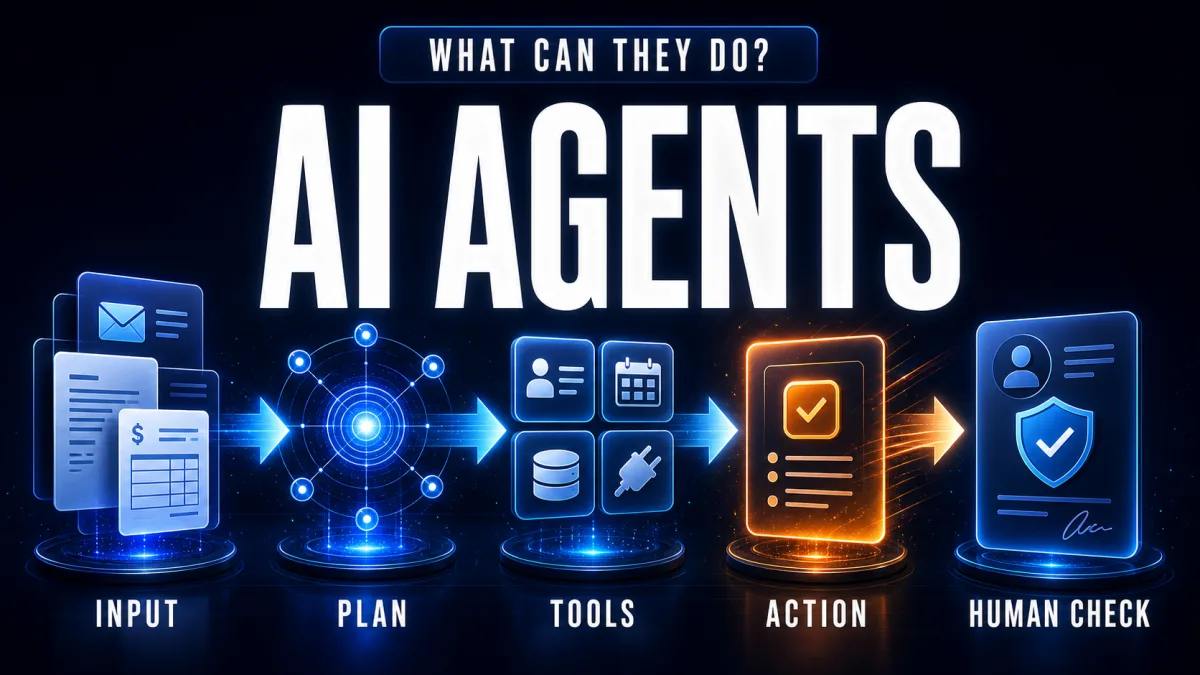
AI agents can do more than answer questions: they can turn an outcome into a sequence of controlled actions. An agent can read an email, retrieve context, decide which tool to call, update a business system and report whether the task succeeded. The exact capability depends on the agent’s tools, permissions, data access and approval rules—not on the word “agent” in a product name. At company scale the hard part shifts from what one agent can do to coordinating many, where enterprise agent orchestration still has a deployment gap. Physical operations are catching up too — robots, AI and agents in supply chains.
Definition: An AI agent is a goal-directed system that observes inputs, reasons over context, uses tools and takes actions toward a measurable outcome.
Example: An agent can classify a support request, look up the customer, check policy, create a ticket and send a permitted reply.
Key takeaway: AI agents automate decisions and handoffs around a workflow; they do not replace the need for systems, rules or human oversight.
Business impact: The strongest use cases are repetitive but variable tasks where people spend time reading, deciding, moving information and coordinating systems.
What can AI agents actually do?
AI agents can handle a workflow when the task has a clear goal, accessible information, available tools and a way to verify success. Microsoft describes agents as systems that can work alongside people or on their behalf, from answering questions to reconciling financial statements and handling returns. In practical terms, an agent turns unstructured input into a sequence of permitted actions.
The most useful distinction is between thinking about work and completing work. A language model can summarize an invoice. An agent can extract the invoice fields, check the vendor record, compare the amount with policy, route an exception and update the accounting queue. The second system needs integrations and controls, not just a better prompt.
Which business tasks fit AI agents best?
The best AI-agent tasks combine messy inputs with repeatable decisions and several systems. They are not necessarily the most complicated tasks; they are the tasks where people repeatedly interpret context, choose the next step and pass work between tools.
| Workflow | What the agent can do | Human checkpoint |
|---|---|---|
| Customer support | Classify intent, retrieve account context, check policy, draft or send a permitted reply, escalate exceptions | Refunds, complaints, unusual requests |
| Lead qualification | Read an inbound message, enrich the company record, score fit, update the CRM and route the lead | High-value accounts and uncertain scores |
| Document processing | Extract fields, compare documents, detect missing information and open a review task | Contract terms, ambiguous invoices and compliance decisions |
| Internal knowledge | Search approved sources, synthesize an answer and cite the relevant documents | Sensitive or incomplete information |
| Scheduling and coordination | Compare calendars, propose options, send invitations and update the task record | External commitments and changes with business impact |
| Operations monitoring | Watch events, identify anomalies, open tickets and notify an owner | Alerts that trigger spending, shutdowns or customer impact |
These categories are consistent with the examples described by IBM’s AI-agent use-case guide, including customer support, supply-chain operations, marketing and sales, employee experience, finance and healthcare analysis. The implementation should still start with one narrow workflow rather than a vague promise to “automate the department.”
How do AI agents handle customer support?
An AI support agent can move a request from intake to resolution by combining language understanding with system access. It can identify whether a message is about delivery, billing or a technical problem, retrieve the customer’s record, apply a known policy, prepare a response and create a ticket when a person needs to intervene.
The agent should not invent a refund policy or silently change an order because a customer’s message sounds urgent. A production design separates interpretation from authorization: the agent can recommend an action, while policy rules and approval gates decide whether the action is allowed. See how to automate customer support with AI agents for the workflow design in more detail.
Can AI agents process documents and invoices?
AI agents can process documents by combining extraction, retrieval, comparison and routing. An agent can read an invoice or contract, identify fields, compare the content with a purchase order or policy, flag missing information and send a structured exception to the right queue.
This is different from simply asking an AI model to “summarize this PDF.” The agent needs a destination for the extracted data, rules for deciding what counts as an exception and a verification step before a record is written. Document processing with AI is a related example of how extraction and deterministic downstream actions can be combined.
Can AI agents update CRMs and other business systems?
Yes—if the agent has a narrow, authenticated tool for the required action. A CRM agent can search for a company, add a note, update a stage, create a task or route a lead. A finance agent can retrieve transaction context and prepare a reconciliation review. A support agent can open or update a ticket.
Tool access is also the main safety boundary. A read-only CRM search is lower risk than an unrestricted write tool. A good integration validates fields, limits which records the agent can change, logs each action and returns a clear success or failure response. Connecting AI agents to CRMs, Sheets and Slack shows why the integration layer matters as much as the model.
Can AI agents research and make decisions?
AI agents can research by decomposing a question, searching approved sources, collecting evidence, comparing findings and producing a structured recommendation. They are useful when research is repetitive and the criteria are explicit, such as preparing a supplier shortlist or monitoring competitor updates.
Research does not make the agent’s conclusion automatically correct. The agent needs source boundaries, citations, freshness requirements and a review step for claims that affect money, compliance or public communication. An agent should present evidence and uncertainty, not hide uncertainty behind a confident paragraph.
Can AI agents work with other agents?
A multi-agent system can divide a larger workflow among specialized agents. One agent may classify an incoming request, another may retrieve relevant records, and a third may draft a response or prepare a report. A coordinator can route work between them and combine their outputs.
Multi-agent architecture is not automatically better. Every handoff adds latency, cost, state-management complexity and another place for errors to appear. A single agent with a small set of well-designed tools is usually easier to test. Add multiple agents only when the roles, permissions or evaluation criteria are genuinely different.
What can AI agents not do reliably?
AI agents are not universal replacements for software, rules or human judgment. They remain unreliable when the goal is vague, the data is incomplete, the tools are poorly defined, the success condition cannot be checked or the cost of a wrong action is high.
An agent should not independently approve a contract, delete production data, make an unreviewed medical decision, issue a high-value payment or expose private information. Those tasks may still benefit from AI for extraction, explanation or drafting, but the final action needs deterministic policy and appropriate human control.
Anthropic’s guide to building effective agents makes a related point: workflows with predefined code paths are often preferable when a process is predictable, while agents are useful when the system needs model-driven flexibility. More autonomy is a trade-off, not a quality score.
How should a business choose its first AI-agent task?
Choose a workflow with a clear outcome, repeatable volume, accessible data, safe tool permissions and a measurable review process. Good first projects often involve triage, extraction, drafting, routing or status updates rather than irreversible decisions. Define what the agent may do, what it must ask a person to approve and what evidence counts as success.
A practical first version can be supervised: the agent reads and prepares the work, a human approves the risky step, and the system records what happened. As evaluation data accumulates, the team can automate more of the low-risk path without pretending that every exception is predictable.
The answer to “what can AI agents actually do?” is therefore concrete but bounded: they can connect language-based reasoning to business tools and complete multi-step workflows when the goal, data, permissions and checks are designed properly.
Frequently asked questions
What can an AI agent do that a chatbot cannot?
An AI agent can pursue a goal across multiple steps instead of stopping at a text reply. It can read an email or document, retrieve information from a CRM, choose a tool, update a record, send a permitted message and check the result. A chatbot can explain how to perform those steps, but an agent can perform them when it has the required integrations, permissions and guardrails.
What are the most practical AI agent use cases?
Practical use cases include customer-support triage, lead qualification, document and invoice processing, internal knowledge search, meeting and calendar coordination, sales research, IT help-desk workflows and routine operations monitoring. The best starting tasks have clear inputs, available system access, measurable outcomes and manageable consequences when an edge case is escalated to a person.
Can AI agents work without integrations?
An AI agent can reason and draft content without integrations, but it cannot reliably change the systems where business work happens. To complete real workflows, an agent usually needs tools such as APIs, a CRM connection, a database, email, a calendar, a browser or a document repository. Without tool access, the system is closer to a conversational assistant than an operational agent.
What should AI agents not do autonomously?
AI agents should not make high-impact or irreversible decisions without the right approval path. Examples include sending legally sensitive messages, issuing large refunds, changing payroll, deleting records, approving contracts or exposing confidential data. A safer design gives the agent narrow permissions, logs actions, validates outputs and routes risky exceptions to a human.
Alex
Founder & Lead AI Writer
Alex is the founder of Yowox and lead AI writer since 2024, breaking down complex information into clear, actionable insights for thousands of readers every day. Alex has built AI automation systems for businesses since 2024, focusing on AI agents, workflow automation, and business process optimization.
Save hours. Save thousands.
Practical guides, real workflows, and the latest AI and automation news that matters — straight to your inbox.