By Alex
 How to Avoid Claude Code Usage Limits: Planning, Memory, Models, and Tools
Claude Code usage limits are a shared computational budget, not a simple message counter. Four workflow changes—planning, memory, model matching, and context control—make that budget last longer.
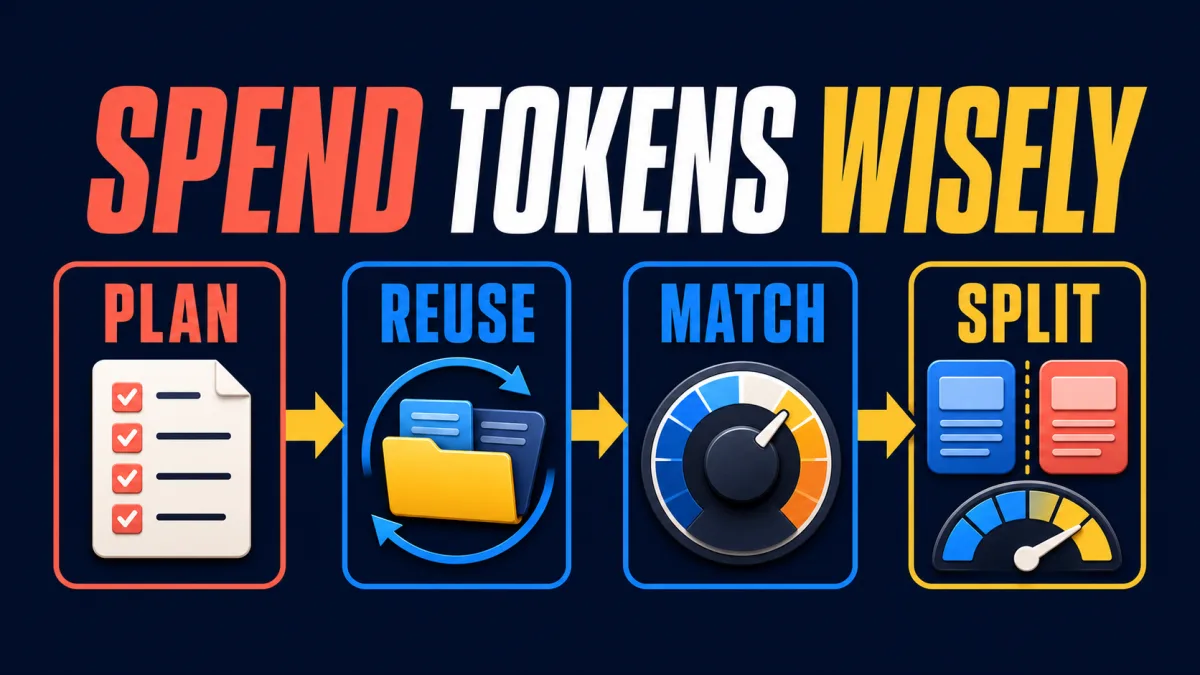
Claude Code usage limits are not a flat message counter: they are a shared budget shaped by context, model choice, effort, tools and time. The source walkthrough from Towards AI turns that observation into four habits: plan before sending, reuse memory instead of re-explaining, match model and effort to the task, and separate unrelated work before context becomes expensive.
Definition: A Claude usage limit controls how much work an account can request over a period; a length limit controls how much one conversation can hold.
Example: A developer can hit a session limit after many short tool-heavy turns, while another reaches a context limit because one thread has accumulated too many files and outputs.
Key takeaway: A fresh chat can fix context rot, but it cannot refund account-level usage.
Practical rule: First identify whether the problem is time-based usage, weekly consumption or conversation length; then apply the matching fix.
What do Claude Code usage limits actually measure?
Claude usage limits measure a plan’s conversation budget across the Claude product surfaces, not just the number of visible messages in Claude Code. Anthropic’s usage and length limits guide says usage is affected by message and conversation complexity, features, model choice and effort level, while Claude.ai, Claude Desktop and Claude Code draw from the same limit. The first action is therefore to check Usage settings before changing a workflow: the account may be spending its budget somewhere other than the current terminal session.
The system also has two different clocks. A rolling session window limits short-term bursts, while a weekly limit governs broader consumption. Those limits can fail independently, so pacing a morning coding session does not guarantee that the weekly budget remains available. The exact allowance and reset time depend on the account and plan; the settings page is the authoritative place to inspect them.
This distinction matters because the remedies are different:
| Problem | What is filling up | What helps | What does not help |
|---|---|---|---|
| Usage limit | Account-level work over time | Batch requests, lower effort, wait for reset, manage tools | Opening a new chat to refund quota |
| Length limit | One conversation’s context | Clear, compact, use projects or delegate | Upgrading without reducing a bloated thread |
| Context rot | Relevant instructions buried under unrelated work | Start a clean context, compact deliberately, split tasks | Carrying the whole “kitchen sink” session forward |
Why do long Claude Code sessions become expensive?
A long Claude Code session consumes more than the text of the user’s latest request. Claude’s context includes earlier messages, files it read, command output, tool definitions and the results of previous actions. Anthropic’s Claude Code best-practices documentation warns that context fills quickly and that model performance can degrade as it fills. The practical takeaway is to treat context as a working surface with a budget, not as an archive that should contain every task from the day.
Tools and connectors add another cost dimension because their definitions and outputs become part of the material Claude must work with. A web search, a broad repository scan or a large log dump may be useful once, but carrying the raw output through every subsequent turn is wasteful when the main task only needs a conclusion. The right question is not “can Claude use this tool?” but “does this tool result belong in the main context?”
Automatic context management can summarize earlier messages when a conversation approaches its context limit, but automatic compaction is not a usage refund. Longer conversations that trigger context management can consume more of the plan’s usage budget, and a summary produced after the context is already crowded may preserve less of what matters. A deliberate boundary is often cheaper than asking one thread to survive indefinitely.
Lever 1: plan the conversation before you send it
Planning the first message reduces usage because it replaces avoidable clarification turns with one well-scoped request. Anthropic’s usage-limit best-practices guide recommends deciding what help is needed, combining related questions and providing useful background up front. In Claude Code, that means naming the target files, the current behavior, constraints, acceptance checks and the requested output before asking the agent to act.
A useful first prompt can contain four parts: the goal, the relevant repository area, the constraints and the proof of completion. For a feature, ask Claude to explore and propose a plan before editing; for a bug, include the observed error and the expected behavior; for a review, provide the complete relevant file rather than sending one function at a time. One complete request is not always shorter than several small prompts, but it gives Claude fewer opportunities to re-orient itself.
Planning is not a ritual for every task. Anthropic’s Claude Code guidance separates clear, small changes from uncertain multi-file work: a typo or one-line log change can go directly to implementation, while an unfamiliar subsystem or multi-file feature benefits from explore → plan → implement → verify. The efficiency gain comes from matching the amount of planning to the risk of rework.
Lever 2: stop paying to re-explain stable context
Memory, chat search and projects reduce usage by moving recurring context out of repeated prompts. Anthropic’s chat search and memory documentation says paid users can search relevant past conversations, while memory and project summaries provide continuity across chats. In practice, a developer should keep stable architecture decisions, coding preferences and project background in an appropriate project or memory surface instead of pasting the same explanation into every new session.
Projects also improve reuse through caching and retrieval. Uploading a reference document once is different from attaching the same document to every question: subsequent requests can retrieve relevant material rather than forcing the entire source back through the conversation. The project still needs maintenance, because stale instructions and obsolete files can mislead Claude, but the alternative—repeatedly rebuilding the same context—is usually worse for both usage and consistency.
Memory is a capability with a privacy boundary, not a free universal cache. Sensitive client information, credentials and short-lived details should not be saved merely because they might be convenient later. If a team enables cross-conversation memory, it should define what belongs there, how users correct or delete it, and which projects require isolated context. The goal is to preserve durable working knowledge, not to retain every conversation indefinitely.
Lever 3: match the model and effort to the task
Model selection and effort level are separate controls, and treating both as “always maximum” is one of the quickest ways to burn a session budget. Anthropic’s model, effort and thinking settings guide explains that higher effort uses more tokens and reaches usage limits faster, while lower effort is appropriate for routine work. Start at the model’s recommended default, then increase the setting when the task’s observed difficulty justifies it.
Use a lighter lane for deterministic work: formatting, straightforward edits, simple lookups, small test additions and boilerplate. Reserve a stronger model or higher effort for ambiguity, architecture, complex debugging and correctness-critical changes. The evidence for raising the model is that Claude had adequate context, made a genuine attempt and still produced an incorrect or incomplete result. The evidence for raising effort is that Claude skipped files, failed to run checks or stopped before verifying the work.
A failed low-effort attempt can cost more than one correctly scoped high-effort attempt because each re-prompt adds another round trip and more context. The goal is not to minimize every individual response; it is to minimize wasted computational work across the task. After switching models in Claude Code, check the active effort setting rather than assuming the previous value carried over.
Lever 4: separate unrelated work before context rots
A fresh context is useful when the task changes, not because a new session refunds usage. Claude Code’s documented best practices emphasize clearing stale context, using deliberate compaction and delegating work that would otherwise flood the main thread. The practical rule is simple: keep one conversation about one coherent outcome, and move research, implementation, debugging and documentation into separate lanes when their outputs do not need to coexist in full.
Use a new conversation for an unrelated task. Use explicit compaction when the current work is still one task but the history contains material that no longer needs to stay verbatim. Give compaction instructions about what must survive—interfaces, decisions, failing tests, constraints and open questions—rather than accepting a vague summary at the point of maximum context pressure.
Use subagents for noisy work with a compact result. Repository exploration, broad log analysis and an independent security review can benefit from a clean context that reports findings back to the parent. A subagent is not free: it makes its own requests against the same shared usage pool. For a one-line edit, delegation adds overhead; for a broad investigation whose conclusion can replace thousands of raw tokens in the main thread, delegation can be a sensible trade.
A practical workflow for a feature-sized change
A password-reset feature shows how the four levers combine without turning the process into ceremony. First, describe the entire outcome—token issuance, email delivery, form validation, expiry and the required tests—in one message. Next, ask Claude to inspect the existing authentication and rate-limiting patterns and produce a plan before editing. Keep the security-sensitive token path in the main session at an effort level appropriate to the risk, while routine email markup or a small frontend form can use a lighter lane.
Before implementation is complete, ask for one batched verification pass covering happy path, expired token, reused token and rate limiting. Give Claude an external check it can run, such as tests or a build, instead of relying on “looks done.” If broad repository exploration was needed, run it in a separate context or subagent and bring back only the findings. At the end, record durable project conventions so the next session does not begin by rediscovering the same authentication structure.
The workflow works because each step removes a different source of waste: batching reduces round trips, memory reduces repeated context, model matching reduces overthinking, and context separation prevents later responses from paying for unrelated history.
How should teams manage a shared Claude budget?
A team should treat Claude usage as an operating policy rather than a private habit because seat-based allowances can be shared. Start by standardizing defaults: routine tasks use normal model and effort settings, complex work documents why it needs more, and every coding task has a verification condition. Track the session and weekly usage bars so a team can distinguish a short-window spike from sustained weekly demand.
Projects should have owners who remove obsolete files and update instructions. Memory should have a privacy policy, especially when client or regulated information is involved. Subagents should be reserved for work that benefits from isolation and summarization, not used as a default way to parallelize trivial edits. These controls often stretch an existing plan further than an immediate upgrade because they remove waste before adding capacity.
If the team applies these practices and still reaches the weekly ceiling consistently, that is useful evidence that the plan’s capacity is genuinely too small. At that point, compare the cost of a higher tier or usage credits with the value of the work being completed; do not confuse a capacity decision with a context-management problem.
The limit-avoidance checklist
- [ ] Check Usage settings: session limit, weekly limit or context length?
- [ ] Put the goal, relevant files, constraints and acceptance checks in the first message.
- [ ] Batch related questions and avoid drip-feeding requirements.
- [ ] Use projects, memory and chat search for stable context, with privacy boundaries.
- [ ] Start at the model’s default effort; increase it only after evidence of difficulty.
- [ ] Keep unrelated tasks out of the main thread.
- [ ] Compact deliberately with instructions about what to preserve.
- [ ] Delegate noisy, summarizable work; keep small edits in the main session.
- [ ] Ask Claude to run tests, builds or other checks and show the evidence.
Claude Code usage limits are easier to manage when the workflow stops treating every turn as equivalent. The budget is shared, the clocks are separate, and the expensive part is often not the task itself but the re-orientation, redundant context and unnecessary reasoning surrounding it. Plan the request, preserve only durable context, choose the right model and effort, and give each substantial task a clean lane.
Frequently asked questions
What is the fastest way to reduce Claude Code usage?
Start by batching related requests into one complete message, then use the lowest model and effort level that can handle the task. Give Claude the relevant files, constraints and acceptance checks up front instead of discovering them through many correction turns. For a long session, clear unrelated work from the context or delegate noisy exploration to a subagent. These steps reduce repeated orientation, unnecessary reasoning and context carried into every later response.
Do new Claude Code sessions restore usage limits?
No. A new session clears the visible conversation context, but it does not refund account-level usage. Claude usage is shared across Claude.ai, Claude Desktop and Claude Code, and subscription plans can include both a shorter session window and a weekly limit. Starting a new session helps with context length and context rot; it does not reset a usage window. Check the Usage settings page to see whether the session or weekly limit is the actual constraint.
Should I always use the strongest Claude model for coding?
No. Use the least expensive model and effort level that reliably completes the task. Routine edits, straightforward tests and simple lookups usually need less effort than architectural decisions, ambiguous debugging or correctness-critical work. Start with the model's default effort, then increase the model or effort only when Claude had adequate context and still failed, skipped important work or could not verify its result.
When are subagents worth the extra usage?
Subagents are useful when the work is noisy, broad or easy to summarize, such as codebase exploration, log analysis or a separate security review. They run their own requests against the same usage pool, so they are not a free optimization. A subagent is usually a poor trade for a one-line edit that would not pollute the main context. Delegate when a clean context and a compact conclusion save more than the additional request overhead.
Alex
Founder & Lead AI Writer
Alex is the founder of Yowox and lead AI writer since 2024, breaking down complex information into clear, actionable insights for thousands of readers every day. Alex has built AI automation systems for businesses since 2024, focusing on AI agents, workflow automation, and business process optimization.
Save hours. Save thousands.
Practical guides, real workflows, and the latest AI and automation news that matters — straight to your inbox.