 By Alex
 Token Saver sends Claude only the PDF pages that matter
Token Saver is a local Claude Desktop extension that retrieves only relevant, page-cited PDF passages with hybrid search instead of sending entire documents into every conversation.
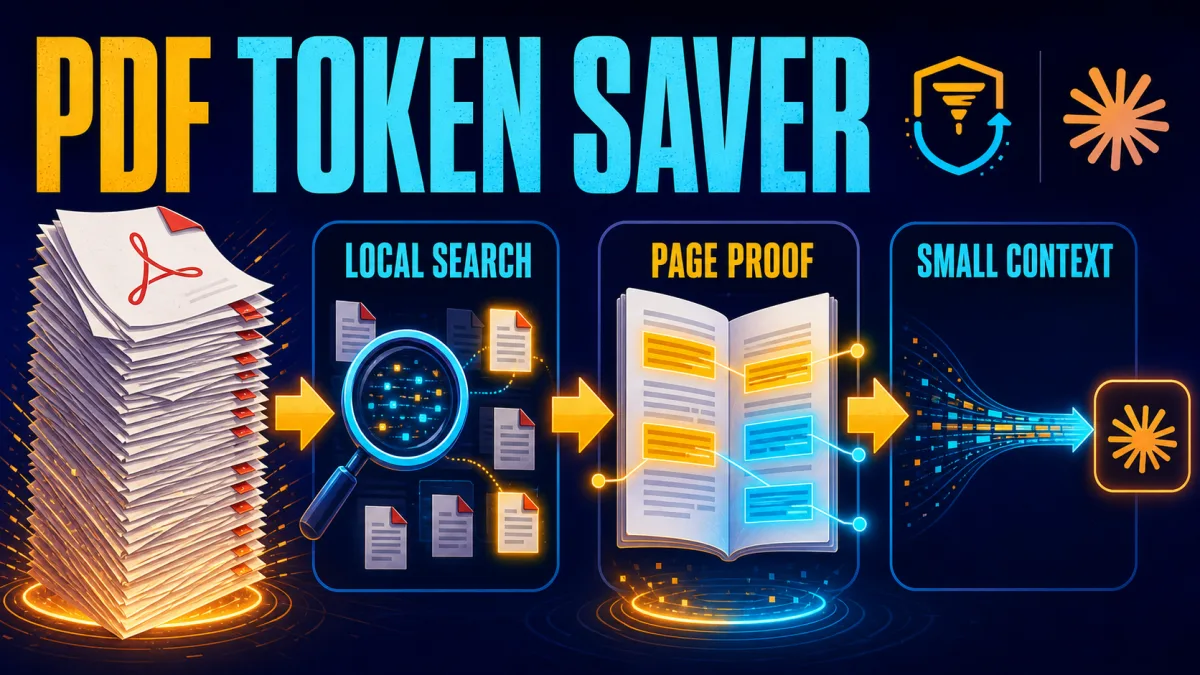
Token Saver is an open-source Claude Desktop extension that searches large PDFs locally and sends Claude only relevant, page-cited passages instead of the full document. Marktechpost’s announcement and technical overview describes the extension as a local MCP server built around hybrid retrieval, with reported savings in the 92–99% range depending on the document and baseline. For operators who repeatedly question long reports, contracts or legal opinions, the practical takeaway is simple: retrieve first, then pay the model to reason over a smaller context.
Definition: Token Saver is a local MCP extension for Claude Desktop that retrieves relevant PDF passages before Claude answers.
Example: A question about a 300-page report can return a small set of cited passages instead of repeatedly sending the whole report.
Key takeaway: The extension moves extraction and retrieval to the local machine while leaving synthesis to Claude.
Business impact: Teams can reduce repeated context transfer for large documents, while keeping the source PDF inside a user-selected folder.
Why full-PDF chats create a token drain
Large-PDF analysis becomes expensive when the entire document is placed into the model context for every follow-up question. Token Saver’s open-source README frames the problem as a repeated context cost: a 200-page PDF is not paid for only once when the conversation keeps sending the document back to the model. The operator-level fix is to avoid treating the model as the document database and instead send it a small, verified slice for each question.
Claude PDF workflows can also carry layout and image information, while a long text extraction adds its own token load. That makes whole-document prompting a poor default when the reader needs two clauses, one definition or a particular table. Use full-document context when the task genuinely requires broad comparison; use retrieval when the task is targeted.
How Token Saver’s local hybrid RAG works
Token Saver combines keyword retrieval with local semantic retrieval so that a question can match both exact terminology and related meaning. The extension uses SQLite FTS5 for BM25-style keyword search at a 0.4 weight and a local all-MiniLM-L6-v2 embedding model for cosine similarity at a 0.6 weight, then blends the scores before filtering and trimming the result. This is the same general retrieval principle explained in what RAG is: keep a larger knowledge source outside the model context and fetch only the evidence needed for the current answer.
The embedding model is designed for sentence and paragraph embeddings in a 384-dimensional vector space, according to its Hugging Face model card. Token Saver treats that model as optional: if it cannot load, the extension falls back to keyword-only matching. That fallback matters operationally because retrieval remains available even when a local semantic dependency is unavailable.
What happens before a passage reaches Claude?
Token Saver’s pipeline is a local sequence of extraction, chunking, scoring, gating, deduplication, trimming, budgeting and packaging. The project describes 180-word chunks with 40-word overlap, a semantic similarity floor of 0.25 for passages without exact keyword matches, an 8,000-character payload cap and an envelope that carries the source filename and page number. The takeaway for a document workflow is to inspect the retrieved citations, not just the final prose.
The page citation is the important control point. A response that names the source file and page gives the reader a route back to the PDF, while a response built from an unbounded context can be difficult to audit. Token Saver does not remove the need for human verification; it makes verification more targeted by narrowing the evidence window.
How large are the reported savings?
Token Saver’s published measurements show that savings increase as the document grows because the returned slice stays relatively bounded. The repository’s current README reports approximately 14% savings versus pasting a roughly 20-page document once, 78% for about 80 pages and 94% for about 300 pages; versus repasting the document on every turn, the corresponding figures are about 83%, 96% and 99%. These are project measurements using a stated tokenizer and baseline, not a universal Claude billing guarantee, so teams should reproduce them against their own files and interaction pattern.
| Document size | Versus pasting once | Versus repasting each turn |
|---|---|---|
| About 20 pages | 14% | 83% |
| About 80 pages | 78% | 96% |
| About 300 pages | 94% | 99% |
The repository also reports retrieval recall@5 of 0.90 on 30 author-written questions over two real documents, with a 0.00 false-abstain rate in that evaluation. Those numbers describe the project’s test set and current implementation; they should be read as evidence about the tool, not as a promise for every PDF genre or query.
What privacy controls does the extension provide?
Token Saver keeps document extraction and search local, then sends only selected passages to Claude, according to the project documentation. The extension uses a user-selected folder as an allowlist, refuses files outside that boundary, and communicates with Claude Desktop over stdio rather than exposing a listening network service. For legal, financial or internal documents, configure a narrow folder and treat the allowlist as a security boundary, not as a substitute for organizational access controls.
Local retrieval reduces the amount of document content crossing the model boundary, but it does not make the whole workflow risk-free. The selected passages still go to the configured model, and Claude can still produce an incorrect synthesis. Users should check the cited pages and avoid placing unrelated sensitive files in the configured folder.
How does the one-click installation work?
Token Saver is distributed as a .mcpb Desktop Extension bundle, a format intended for one-click local MCP server installation in desktop applications. The MCPB project documentation describes the broader bundle format; Token Saver’s installation path is to download its release bundle, install it from Claude Desktop’s Extensions settings, enable it, choose a dedicated PDF folder and allow the tool on the first question.
The extension’s setup removes a common source of friction: users do not need to create a Python environment, run a separate terminal command or write a JSON server configuration just to begin. The first startup can still take a few minutes while the local retrieval engine loads, and the project recommends choosing a small, deliberate folder rather than all of Documents or Downloads.
Where Token Saver fits in a document workflow
Token Saver is best understood as a retrieval layer for repeated questions about local documents, not as a replacement for document processing, OCR or human review. A simple PDF question can use local retrieval and page citations; a workflow that extracts invoice fields, validates totals and routes exceptions needs the broader controls described in AI document processing. The distinction prevents teams from using a retrieval tool where they actually need structured extraction and downstream automation.
The same boundary applies to accuracy. Token Saver can abstain when retrieval finds no qualifying evidence, but the README notes known limitations around wrong-file selection, false accepts and page-only provenance. Name the document precisely, ask for citations and open the cited pages when the answer affects a legal, financial or operational decision.
What the release changes for Claude PDF users
Token Saver makes a familiar trade-off explicit: local code can search a document more cheaply and privately, while Claude remains responsible for natural-language synthesis. Its strongest fit is a large local PDF, repeated follow-up questions, a need for page citations and a user comfortable checking retrieved evidence. Its weaker fit is a short document, a question that requires comparing every page at once or a workflow that needs structured fields rather than passages.
The release is therefore less about eliminating model costs than about choosing where context work happens. For long documents, the useful pattern is local extraction and retrieval first, bounded evidence second, model reasoning third.
Frequently asked questions
What is Token Saver?
Token Saver is an open-source Claude Desktop extension from Marktechpost that searches PDFs locally and sends Claude only the passages relevant to a question. The extension uses hybrid retrieval, page-number citations and a folder allowlist, so users can ask about large documents without uploading the full files to the model. It is distributed as a one-click .mcpb bundle, which removes the need to create a Python environment or configure a local terminal process manually.
How does Token Saver reduce PDF token usage?
Token Saver reduces PDF token usage by extracting and chunking the document on the user's machine, ranking chunks with keyword and semantic search, trimming them to relevant sentences and capping the returned payload before Claude sees it. The project's published measurements show that savings grow with document size: its README reports roughly 94% versus pasting once and 99% versus repasting each turn for a document of about 300 pages. The exact percentage depends on the document, query and comparison baseline.
Does Token Saver upload the PDF to Claude?
Token Saver is designed so the PDF, extraction and retrieval remain on the local machine; only the selected answer passages are sent to Claude. The extension also restricts file access to a folder the user explicitly chooses and communicates with Claude Desktop over standard input/output rather than opening a listening network port. Those controls reduce the document's exposure, but users should still review the project's security guidance and their own Claude Desktop settings before using sensitive files.
Is Token Saver useful for every PDF?
Token Saver is most useful for medium and large PDFs that would otherwise be repeatedly placed in a model context window. The project's README says the crossover is around 15-20 pages and that smaller documents can cost more when the retrieved slice is larger than the original. Retrieval quality also depends on choosing the right file and checking the cited pages, so Token Saver should be treated as a focused retrieval layer rather than a guarantee that every answer is correct.
Alex
Founder & Lead AI Writer
Alex is the founder of Yowox and lead AI writer since 2024, breaking down complex information into clear, actionable insights for thousands of readers every day. Alex has built AI automation systems for businesses since 2024, focusing on AI agents, workflow automation, and business process optimization.
Save hours. Save thousands.
Practical guides, real workflows, and the latest AI and automation news that matters — straight to your inbox.


