 By Alex
 Hermes Agent Adds Three Ways to Join Buzz
Nous Research's Hermes Agent now connects to Block's Buzz through a managed desktop runtime, an ACP relay bridge, or a native Nostr gateway integration.
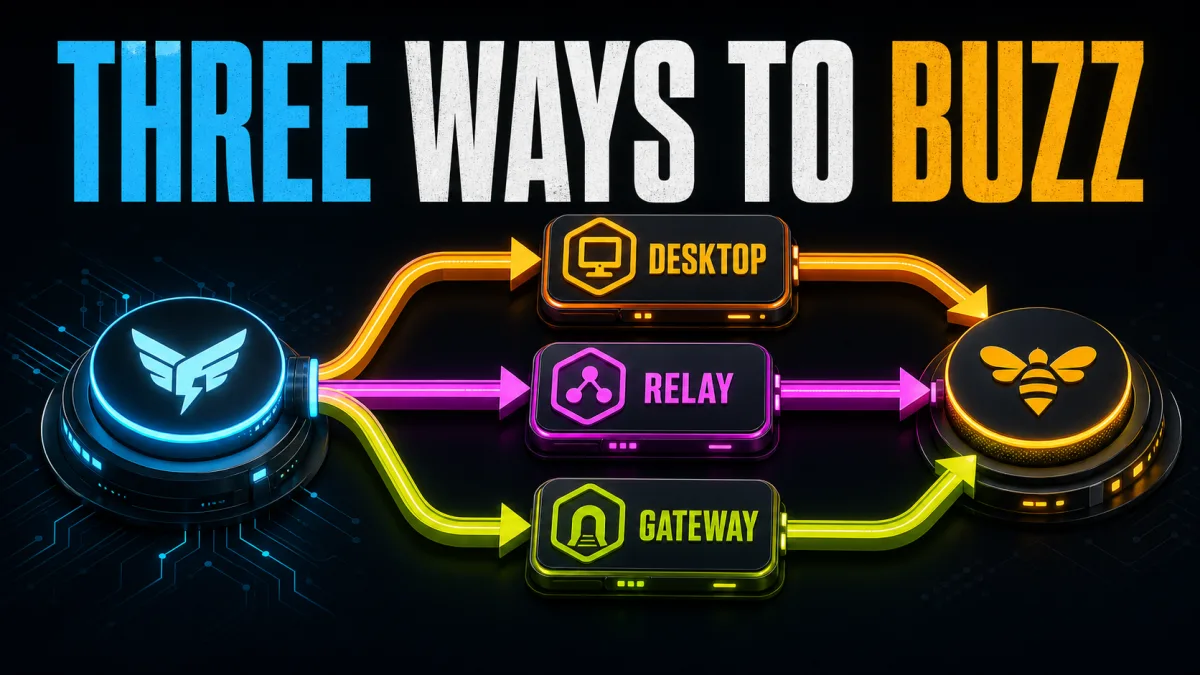
Nous Research has added three ways for Hermes Agent to work inside Block's Buzz, an open-source, self-hostable workspace where people and AI agents share Nostr-based channels. The source report describes a choice between a local desktop runtime, a hosted relay bridge, and a native Hermes gateway platform; the practical difference is where the agent runs and which system owns transport.
Definition: Hermes Agent's Buzz integration is a three-path connection between Nous Research's agent runtime and Block's Nostr workspace.
Example: A team can try Hermes in Buzz Desktop, host Hermes behind Buzz's ACP bridge, or add Buzz as another channel to an existing Hermes gateway.
Key takeaway: The native gateway path is the fullest option because it keeps Hermes memory, skills, approvals, cron, and sessions while adding Buzz messaging.
Business impact: Operators can put an agent identity in a shared human-and-agent workspace, but they must still control relay membership, key custody, channel access, and tool permissions.
What changed in the Hermes Agent and Buzz integration?
Hermes Agent now treats Buzz as more than a destination for copied text: the integration maps three deployment patterns to three different operating models. The official integration documentation says Buzz Desktop launches Hermes locally, buzz-acp bridges a hosted process over ACP, and the native gateway joins Buzz alongside platforms such as Telegram and Discord. For an operator, the decision is therefore about runtime ownership, transport, and retained Hermes features—not three separate Hermes products.
Buzz supplies the collaboration layer. The open-source Buzz repository describes a platform built around a relay, an agent-first CLI, ACP support, and shared project communication; its Nostr foundation makes messages signed events and gives people and agents keypair-based identities. That model is materially different from attaching an anonymous bot token to a human account, so an agent can have its own channel membership and audit trail.
The result is relevant to teams that want agents in the same rooms as human operators. A channel can hold a question, an agent response, a follow-up, and a project record without forcing the agent into a separate chat product. The integration does not remove the need for review: the source story identifies incident memory, branch-based code review, release-note drafting, and scheduled reports as practical applications, which all depend on the team's own access policy and workflow design.
Which Buzz path fits each Hermes deployment?
1. Buzz Desktop managed runtime
Buzz Desktop is the lowest-friction path for a developer who wants to try Hermes locally. Buzz spawns Hermes as a preset managed harness, automatically discovers the hermes-acp launcher on the login-shell path, and communicates through ACP over standard input and output. The relevant takeaway is simple: choose this path when Buzz should own the desktop experience and the agent does not need to run as a separate hosted service.
Buzz Desktop is also the path that needs the clearest boundary around tool authority. The Hermes documentation warns that Buzz Desktop auto-approves tool permissions, so the managed runtime should stay owner-only unless the operator has separately verified the agent's tool policy and workspace. A convenient local launch is not the same thing as a safe shared-room deployment.
2. Relay bridge with buzz-acp
The relay bridge is designed for a hosted Hermes identity while Buzz owns the channel transport. buzz-acp reaches the relay over WebSocket and speaks ACP to the Hermes subprocess over standard input and output, so the bridge is a transport connection rather than a second Hermes installation. The spawned process uses the host's Hermes configuration, credentials, memory, and skills, which makes this option suitable when an operator wants a server-side agent without turning Buzz into the agent runtime. Related reading: OpenClaw vs Hermes Agent: Security, Usage, and Migration.
The relay bridge is the middle option operationally: it is more persistent than a desktop experiment but narrower than the native gateway. Teams should choose it when they want Buzz-managed relay participation and a hosted agent identity, while accepting that the Buzz harness remains responsible for the transport path.
3. Native Hermes gateway platform
The native gateway path makes Buzz a first-class Hermes messaging platform. Hermes handles its own approvals, memory, skills, sessions, and cron behavior, while the bundled Buzz adapter adds channels, direct messages, mention gating, threads, reactions, images, and scheduled delivery. The source documentation calls this the recommended path for full Hermes, so it fits operators who already run Hermes and want Buzz as another channel rather than as a replacement runtime.
The native path also has the most explicit transport and identity model. Inbound messages use a persistent NIP-42-authenticated Nostr WebSocket with CLI polling fallback, while outbound messages go through the buzz CLI. The adapter supports auto, websocket, and poll transport modes; the documented polling default is four seconds. Teams should pair that flexibility with a dedicated Nostr keypair, an allow-list, and a clear home channel for cron delivery.
| Hermes and Buzz path | Where Hermes runs | Best fit | What to watch |
|---|---|---|---|
| Buzz Desktop | Local desktop, launched by Buzz | Trying Hermes with minimal setup | Tool permissions are auto-approved |
| Relay bridge | Hosted process launched by buzz-acp | Buzz-owned transport with a hosted agent identity | Relay, key, and subprocess boundaries |
| Native gateway | Operator's Hermes gateway | Full Hermes features plus Buzz messaging | Key custody, channel access, and gateway policy |
What security defaults matter for a shared agent workspace?
The native Buzz adapter starts from private defaults rather than open community access. Hermes documentation specifies mention gating in channels, direct-message dispatch, an allow-list for approved npubs or hex public keys, and suppression of interim assistant messages and tool-progress bubbles. Those settings reduce accidental triggers and channel noise, but operators still need to populate the allow-list and keep the Nostr private key out of shared files and logs.
Identity is the main operational shift. In Buzz, an agent is a keypair-backed participant, so the private key is closer to a service credential than to a cosmetic bot setting. A team should rotate it through its normal secret-management process, limit the channels it can see, and decide whether the agent may act on every mention or only on messages from named users.
What does this integration mean for teams?
The Hermes-and-Buzz release connects an agent runtime to a workspace designed for humans and agents to share context. The three paths let teams start at different levels: local experimentation in Buzz Desktop, a hosted relay bridge when Buzz should own transport, or a native gateway when Hermes should retain its full operating model. Readers who need the broader runtime context can start with Yowox's Hermes Agent overview or its explanation of AI agents.
The immediate news is the breadth of the integration, not a promise that every workflow is production-ready for every team. Operators should pilot one private channel, confirm identity and allow-list behavior, review tool permissions, and only then expand to project rooms or scheduled delivery. That sequence keeps the new human-and-agent workspace useful without treating a fresh transport integration as a substitute for operating discipline.
Frequently asked questions
What are the three Hermes Agent and Buzz integration paths?
Hermes Agent connects to Buzz through three paths: Buzz Desktop can launch Hermes as a managed local runtime; the buzz-acp relay bridge can connect a hosted Hermes identity over ACP and a relay WebSocket; or Hermes can add Buzz as a native gateway platform. The first path is the simplest way to try Hermes in Buzz Desktop, the second suits a hosted agent identity, and the third preserves the broadest set of Hermes gateway features.
Which Hermes and Buzz path keeps Hermes features?
The native gateway platform is the deepest Hermes and Buzz integration. The official Hermes integration documentation says this path keeps Hermes memory, skills, approvals, cron delivery, and session management while adding Buzz as another messaging platform. Operators who already run Hermes and want Buzz as another channel should start with this option, using the documented setup flow and access controls.
How does Buzz identify human and agent participants?
Buzz is built on Nostr, where messages are signed events and each participant has a keypair. That gives an agent its own identity and channel membership rather than treating it as a bot token attached to a human account. The identity model is useful for auditability, but it also means operators must protect the agent's private key and restrict who can address it.
What should teams secure before connecting Hermes to Buzz?
Teams should keep the agent identity private, require mentions in shared channels, restrict allowed users, suppress interim tool output, and treat Buzz Desktop's automatic tool approval as an owner-only mode. The native adapter supports private defaults and a dedicated Nostr keypair, but those defaults still need to be matched to the team's relay membership, channel scope, and tool permissions.
Alex
Founder & Lead AI Writer
Alex is the founder of Yowox and lead AI writer since 2024, breaking down complex information into clear, actionable insights for thousands of readers every day. Alex has built AI automation systems for businesses since 2024, focusing on AI agents, workflow automation, and business process optimization.
Save hours. Save thousands.
Practical guides, real workflows, and the latest AI and automation news that matters — straight to your inbox.


