 By Alex
 Google Vids adds Gemini Omni and personal avatars
Google Vids is adding Gemini Omni for prompt-based video generation and editing, plus personal avatars that can deliver typed scripts in a digital version of the account holder.
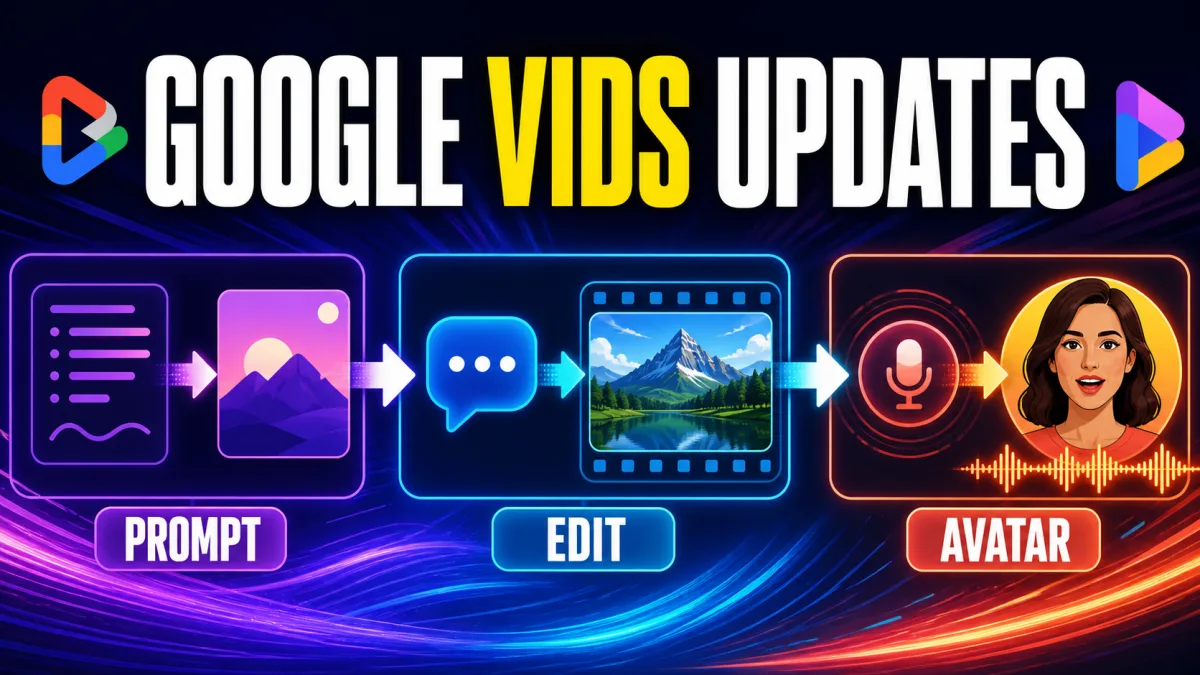
Definition: Google Vids is adding Gemini Omni for prompt-based video generation and editing, plus personal avatars for videos starring a digital version of the account holder.
What changed: Users can describe a clip, refine it conversationally and create an avatar by recording their face and voice.
Who it affects: Google AI Pro and Ultra subscribers and Google Workspace business customers, with age, language and regional limits for personal avatars.
Key takeaway: More video production is moving from camera setup and timeline controls into natural-language direction.
Google Vids is becoming less like a presentation timeline and more like a place where a creator can describe the result they want. TechCrunch reports that Google is adding Gemini Omni and personal avatars to its workplace video tool.
In Google’s announcement, the company describes two related but distinct changes: Gemini Omni generates and edits video clips, while personal avatars let a user appear in a generated message without recording each take on camera.
What Gemini Omni changes in Google Vids
Gemini Omni lets Google Vids users start with a natural-language description of what they want to see. Users can also add image references, including a photo or rough sketch, to give the generated clip more visual direction.
That changes the first step of the workflow. Instead of beginning with a timeline and manually assembling every visual element, a creator can describe a scene, provide a reference and ask Google Vids for a reviewable draft. The output is still generated video, so the useful unit is not a finished production but a starting point that a person can inspect.
The feature also supports step-by-step refinement. Google says Omni can edit a generated clip or a video shot on a phone when the user describes a change in everyday language. The examples include swapping a background, fixing lighting and adding effects.
How conversational video editing works
Conversational editing in Google Vids is aimed at targeted iteration rather than one-click automation. A user describes the result they want, reviews the updated clip and continues with another instruction if necessary.
Conversational editing in Google Vids is useful when a creator knows the intended result but does not want to translate that result into timeline controls. In the Gemini Omni rollout, Google says users can describe changes such as swapping backgrounds, fixing lighting or adding effects to a generated clip or a video shot on a phone. The practical takeaway for Google Vids users is to make one focused request, inspect the returned clip and continue only when the edit matches the brief.
The model does not remove editorial work. A generated scene can still be visually wrong, tonally off or unsuitable for its audience. Teams that already think in terms of a defined AI automation stack can treat Omni as another production layer: the model creates or changes an asset, while the brief, review rules and approval decision remain outside the model.
What personal avatars add to Google Vids
Personal avatars address a different bottleneck: appearing in the video. Google says a user can record their face and voice, select the resulting avatar and type or describe what the avatar should say and do.
The result is a generated video that looks and sounds like the account holder without requiring a new camera recording for every message. That makes the feature relevant to short updates, explanations and personalised communications where the sender wants a recognisable presence but does not want the setup time of another take.
The account boundary is part of the product definition. Google says personal avatars are linked to a user’s Google Account and restricted to the account holder’s likeness. A personal avatar is therefore not described as an unrestricted synthetic-spokesperson library; it is a reusable digital version of the person who created it.
How the two Google Vids updates fit together
| Video task | Google Vids update | User input | Result |
|---|---|---|---|
| Create visual material | Gemini Omni | Natural-language prompt and optional image reference | Generated video clip |
| Refine a clip | Gemini Omni | Conversational change request | Iterated clip without starting over |
| Appear in a message | Personal avatars | Face and voice recording plus a prompt or script | Avatar-delivered video |
| Share with transparency | SynthID | Generated clip | Invisible provenance signal |
The updates are complementary, not interchangeable. Gemini Omni is mainly about the visual asset and how it is changed. Personal avatars are mainly about the presenter and how that presenter is reused in a generated scene.
Why personal-avatar restrictions matter
Google’s help documentation says users must be 18 or older and currently create the avatar by recording their face and voice with a phone or tablet. The same documentation says personal avatars are currently unavailable in the EEA, Switzerland and the United Kingdom, and are supported only in English.
Google Vids personal-avatar availability depends on age, language, geography and account eligibility. Google’s help documentation says users must be 18 or older, the feature currently supports English and personal avatars are unavailable in the EEA, Switzerland and the United Kingdom. The practical takeaway for a team evaluating Google Vids is to check the account that will create and share the videos instead of treating a subscription as a guarantee of access.
Google also says users can retake or delete their personal-avatar data through their Google Account. That gives the feature a lifecycle beyond a single generation: the account owner can update the source recording or remove the avatar when it is no longer wanted.
What SynthID adds to AI video sharing
Google says every generated clip includes an invisible SynthID digital watermark that can help people verify that a video was created with AI. The watermark is a provenance signal, not a complete explanation of the video’s editing history or intended context.
That distinction matters for business communication. A generated clip can carry an origin signal and still need a human review for accuracy, likeness, tone, disclosure and audience fit. Yowox’s comparison of Content Credentials and SynthID covers the same broader point: provenance technology can support transparency, but it does not replace editorial responsibility.
The issue is part of a wider shift in AI video tools. Meta’s Muse Image and Muse Video announcement also treats generation, editing and provenance as connected product concerns, even though its release scope differs from Google Vids. In both cases, the workflow is becoming more capable while the need to identify what was generated remains.
What changes for business video teams
For business users, the practical change is less about replacing every video specialist and more about lowering the effort required for small, frequent communications. Gemini Omni can turn a rough visual direction into a draft and accept focused edits. A personal avatar can deliver a short message when a camera recording would add too much setup time.
That may matter for internal updates, training fragments, product explanations and personalised messages where speed and clarity are more important than cinematic production. The shorter workflow does not guarantee a better message; it gives the team more room to spend time on the brief, review and final approval.
The camera step disappearing does not make the script optional. A rushed script can produce a polished-looking message that is vague, too long or inappropriate for the audience. The responsible workflow remains: define the point, generate a draft, inspect the output, revise what is wrong and disclose AI-generated material when the context requires it.
Google Vids is turning direction into the interface
The two updates share a design direction: the creator describes intent, and Google Vids handles more of the production mechanics. Gemini Omni applies that idea to the visual asset. Personal avatars apply it to the person delivering the message.
For eligible users, the result is a video workflow that can start with a prompt, continue through conversational edits and finish with a typed script delivered by a reusable likeness. That does not make video creation automatic. It moves the hard part toward direction, review, identity boundaries and the final message.
Google Vids users evaluating the rollout should check three things first: whether the relevant feature is enabled for the account, whether the generated clip matches the intended brief and whether the team has a clear review and disclosure process for avatar-led video. The update makes production easier to start; it does not remove the decisions that make a video fit for sharing.
Frequently asked questions
What are the two new Google Vids updates?
Google is rolling out Gemini Omni and personal avatars in Google Vids. Gemini Omni lets users create video clips from natural-language prompts and image references, then refine those clips through conversational edits. Personal avatars let a user record their face and voice, describe a scene and generate a message delivered by an avatar that looks and sounds like them. One update changes the visual material; the other changes how the presenter appears.
How does Gemini Omni create videos in Google Vids?
Gemini Omni turns a natural-language description into a video clip inside Google Vids. Users can add image references, such as a photo or rough sketch, to provide more detail about the intended result. Google describes the feature as a way to generate and edit video through everyday language rather than a conventional sequence of manual editing steps. The generated result still needs human review for visual accuracy, tone and audience fit.
Can Gemini Omni edit an existing video?
Yes. Google says users can refine a clip generated with Omni or a video shot on a phone through conversational instructions. Examples include swapping backgrounds, fixing lighting and adding effects. The step-by-step editing flow is designed to let users make changes without starting over, so Omni can support both an initial draft and targeted iteration. The creator remains responsible for checking whether the requested change produced an accurate and suitable result.
How do personal avatars work in Google Vids?
A user creates a personal avatar by recording their face and voice through Google Vids on a phone or tablet. They can then select that avatar, describe how it should appear in a generated video and optionally provide a script. Google says the account owner controls where the avatar is created and used, and the avatar is tied to that Google Account rather than being a general-purpose likeness anyone can select.
Who can use personal avatars in Google Vids?
Google says Gemini Omni and personal avatars are available in Google Vids for Google AI Pro and Ultra subscribers and Google Workspace business customers. Personal-avatar access is limited by age, language and geography: Google’s help documentation says users must be 18 or older, the feature currently supports English, and it is unavailable in the EEA, Switzerland and the United Kingdom. Availability can still vary by account and plan. More on this: Google Ads AI tools speed up marketing analysis. Related reading: Google Preferred Sources target AI search traffic losses.
Frequently asked questions
What are the two new Google Vids updates?
Google is rolling out Gemini Omni and personal avatars in Google Vids. Gemini Omni creates video clips from natural-language prompts and image references, then supports conversational edits. Personal avatars let a user record their face and voice, type a script and generate a video delivered by an avatar that looks and sounds like them. One update changes the visual material; the other changes how the presenter appears.
How does Gemini Omni create videos in Google Vids?
Gemini Omni turns a natural-language description into a video clip inside Google Vids. Users can add image references, such as a photo or rough sketch, to give the model more detail about the intended result. Google presents Omni as a way to generate and edit clips through everyday language. The output remains a generated video that needs human review before it is shared.
Can Gemini Omni edit an existing video?
Yes. Google says users can refine a clip generated with Omni or a video shot on a phone through conversational instructions. Examples include swapping backgrounds, fixing lighting and adding effects. The step-by-step editing flow is designed to let users make changes without starting over, so Omni supports both an initial draft and targeted iteration.
How do personal avatars work in Google Vids?
A user creates a personal avatar by recording their face and voice through Google Vids on a phone or tablet. They can then select that avatar, describe the scene and optionally provide a script for the generated video. Google says the account owner controls where the avatar is used, and the avatar is tied to that Google Account rather than being a general-purpose likeness anyone can select.
Who can use personal avatars in Google Vids?
Google says Gemini Omni and personal avatars are available in Google Vids for Google AI Pro and Ultra subscribers and Google Workspace business customers. Personal-avatar access is limited by age, language and geography: Google’s help documentation says users must be 18 or older, the feature currently supports English, and it is unavailable in the EEA, Switzerland and the United Kingdom. Availability can still vary by account and plan.
Alex
Founder & Lead AI Writer
Alex is the founder of Yowox and lead AI writer since 2024, breaking down complex information into clear, actionable insights for thousands of readers every day. Alex has built AI automation systems for businesses since 2024, focusing on AI agents, workflow automation, and business process optimization.
Save hours. Save thousands.
Practical guides, real workflows, and the latest AI and automation news that matters — straight to your inbox.


