 By Alex
 Grok Imagine Image 2.0 makes image editing practical
Grok Imagine Image 2.0 is now generally available with local edits, segmentation, background removal, five-image references, smart resize and workflow templates.
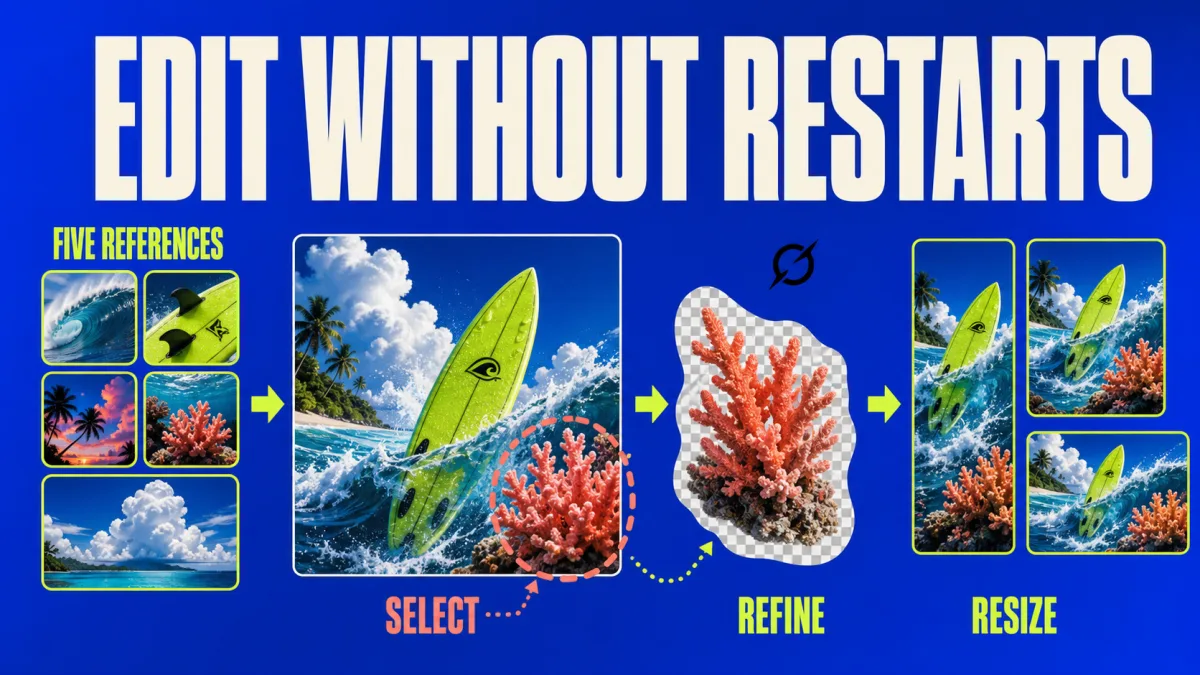
Grok Imagine Image 2.0 is xAI's new image-generation and editing release, and its important change is not another prompt box: editing is now the centre of the workflow. The model is generally available as Quality Mode in Grok Imagine on the web and in the iOS and Android apps, with xAI emphasizing precise changes, typography, layout and preservation of user inputs across iterations. Related reading: Grok 4.6 Targets Long-Running Agents and Visual Work.
Definition: Grok Imagine Image 2.0 is xAI's image model for generating and revising photography, design and illustration.
Example: A user can select one area, remove a background, combine up to five references, then resize the finished composition for a different format.
Key takeaway: Grok Imagine Image 2.0 is designed to reduce the number of times a creative team must restart an image from scratch.
Business impact: Teams can evaluate Grok Imagine Image 2.0 as an iterative production tool, but they still need to verify every edited detail, label and product representation before publication.
What changed in Grok Imagine Image 2.0?
Grok Imagine Image 2.0 turns image creation into a sequence of controlled revisions rather than a one-shot generation. xAI lists a Magic Wand for editing the region a user points at, Segmentation for selecting precise areas, background removal that exports a transparent subject, and multi-reference editing that accepts up to five input images. For a team producing repeatable creative assets, the practical test is whether the untouched parts stay stable while the requested region changes.
| Capability | What xAI says it does | Practical evaluation |
|---|---|---|
| Magic Wand | Edits the region the user points at | Check whether local changes avoid collateral edits |
| Segmentation | Selects precise areas to modify | Test small, irregular and overlapping objects |
| Background removal | Exports a subject with transparency | Place the result on several backgrounds and inspect edges |
| Multi-reference editing | Accepts up to five input images | Assign each reference a clear role and check preservation |
| Smart Resize | Rebuilds the frame for a chosen ratio | Compare the subject, text and composition across outputs |
The feature list matters because image editing is usually where production time accumulates. A first draft can be visually strong and still fail because one product colour is wrong, a background object must disappear, or the same asset needs a square and a wide version. Grok Imagine Image 2.0 gives each of those jobs a named control, so teams can test the workflow by measuring correction quality instead of judging only the first image.
How does Smart Resize change the workflow?
Smart Resize lets Grok Imagine Image 2.0 recompose one image into nine aspect ratios, from tall banners and vertical frames to square and widescreen formats. The model fills the new frame instead of simply stretching or cropping the original. For marketing teams, the useful sequence is to approve the content first, then generate the formats required by each channel and compare whether important subjects, labels and visual hierarchy survive.
Smart Resize is therefore a composition feature, not a promise that every crop is publication-ready. A generated product poster may need more space around a headline in a wide banner, while a portrait format may place the subject too close to an edge. The source release shows the same scene across ratios but does not publish an accuracy rate for the recompositions, so the responsible workflow is visual QA on every final ratio rather than automatic export to every channel.
Can Grok Imagine Image 2.0 handle real creative assets?
Grok Imagine Image 2.0 is positioned for photography, design and illustration, with xAI specifically highlighting instruction following, typography and layout. The product page demonstrates dense visuals, tutorials, posters, infographics and photo-style scenes; that evidence makes text placement and layout part of the intended use, not an incidental demo. Teams creating functional graphics should still proofread every word and number because a sharp-looking label is not evidence that the information is correct.
Templates extend that product direction by packaging common workflows for photo editing, product colour changes, editorial product posters, e-commerce photos, headshots, icons, character sprites and game assets. A template can reduce setup time for a recurring task, but it does not remove the need to define the task's acceptance criteria. A product-image workflow should specify the required colour, camera angle, background, dimensions and forbidden changes before a team compares outputs.
This workflow orientation connects with the broader shift described in our coverage of Meta's Muse Image: consumer image models are increasingly presented as systems for blending, editing and refining media, not only as text-to-image generators. The competitive question is moving from “which model makes the prettiest first draft?” to “which tool preserves the important parts while completing the next revision?”
What do the Image 2.0 rankings prove?
xAI says Grok Imagine Image 2.0 ranks second in both text-to-image generation and image editing on the relevant Arena leaderboards as of August 7, 2026. The Next Web's coverage notes that the figures come from the public leaderboards cited by the company, with OpenAI's GPT Image 2 listed ahead in both categories. The ranking is useful competitive context, but teams should run their own image-editing test set before selecting a model for production.
A practical benchmark for Grok Imagine Image 2.0 should contain the work a team actually does: local object replacement, background removal, five-reference composition, text-heavy layouts, product colour changes and multiple output ratios. Score each result for instruction fidelity, preservation of unchanged content, typography accuracy, edge quality and the number of manual corrections required. A leaderboard position can signal capability; it cannot establish that a model fits a particular brand, catalogue or approval process.
Is Grok Imagine Image 2.0 ready for an API workflow?
Grok Imagine Image 2.0 is available in consumer products now, while xAI says API access is coming soon without giving a date or technical specification. That distinction matters for businesses: a team can evaluate the interface and output quality immediately, but it cannot yet assume a stable endpoint, model identifier, rate limit, pricing model or data-handling contract from this announcement.
The right pre-API preparation is to build a small evaluation set and record the exact inputs, desired edits, acceptable deviations and human-review steps. That makes a later API comparison measurable instead of anecdotal. It also follows the same principle as an AI automation stack: a model is only one layer, and the production result depends on context, orchestration, permissions, verification and monitoring around it.
What should teams test first?
Teams evaluating Grok Imagine Image 2.0 should begin with five tests: one local edit, one segmentation task, one transparent-background export, one five-reference composition and one Smart Resize pass across the formats they publish. Each test should compare the requested change with the unchanged content and record manual fixes, not just aesthetic preference. This creates a workflow-level decision that the launch announcement alone cannot provide.
The release makes a clear product bet: useful image generation is becoming an editing loop with reusable starting points and format-aware outputs. Grok Imagine Image 2.0 is available for that evaluation today; its future API remains unspecified. Until xAI publishes developer access and independent testing covers the new controls, the grounded conclusion is narrower but useful: Grok is competing on controllable creative iteration, not only on the quality of a single generated image.
Frequently asked questions
What is Grok Imagine Image 2.0?
Grok Imagine Image 2.0 is xAI's image-generation and editing model, available as Quality Mode on grok.com/imagine and in the Grok iOS and Android apps. xAI describes it as a model for photography, design and illustration that follows detailed instructions, handles typography and layout, and preserves user-provided content across generations and edits.
What editing features does Grok Imagine Image 2.0 include?
Grok Imagine Image 2.0 includes a Magic Wand for changing a selected region, Segmentation for precise area selection, background removal with transparent output, multi-reference editing with up to five input images, and Smart Resize for recomposing one image into different aspect ratios. The release also adds workflow templates for tasks such as product shots, headshots, e-commerce photos, icons and game assets.
How many reference images can Grok Imagine Image 2.0 use?
Grok Imagine Image 2.0 accepts up to five input images in one multi-reference generation, according to xAI's launch announcement. The practical use is to assign different roles to the references, such as subject, product, style or composition, then check that the generated result preserves the important details from each image.
Where can people use Grok Imagine Image 2.0?
Grok Imagine Image 2.0 is generally available as Quality Mode on grok.com/imagine and in the Grok apps for iOS and Android. xAI says API access is coming soon, but the announcement does not provide a release date or an API contract, so teams should treat the current product as a consumer-facing workflow rather than a confirmed developer integration.
Alex
Founder & Lead AI Writer
Alex is the founder of Yowox and lead AI writer since 2024, breaking down complex information into clear, actionable insights for thousands of readers every day. Alex has built AI automation systems for businesses since 2024, focusing on AI agents, workflow automation, and business process optimization.
Save hours. Save thousands.
Practical guides, real workflows, and the latest AI and automation news that matters — straight to your inbox.


