 By Alex
 ChatGPT Computer History turns Mac activity into memory
OpenAI's opt-in Computer History feature turns activity from a Mac's allowed apps and websites into a searchable timeline that ChatGPT and Codex can use, while adding new privacy and security decisions for users and employers.
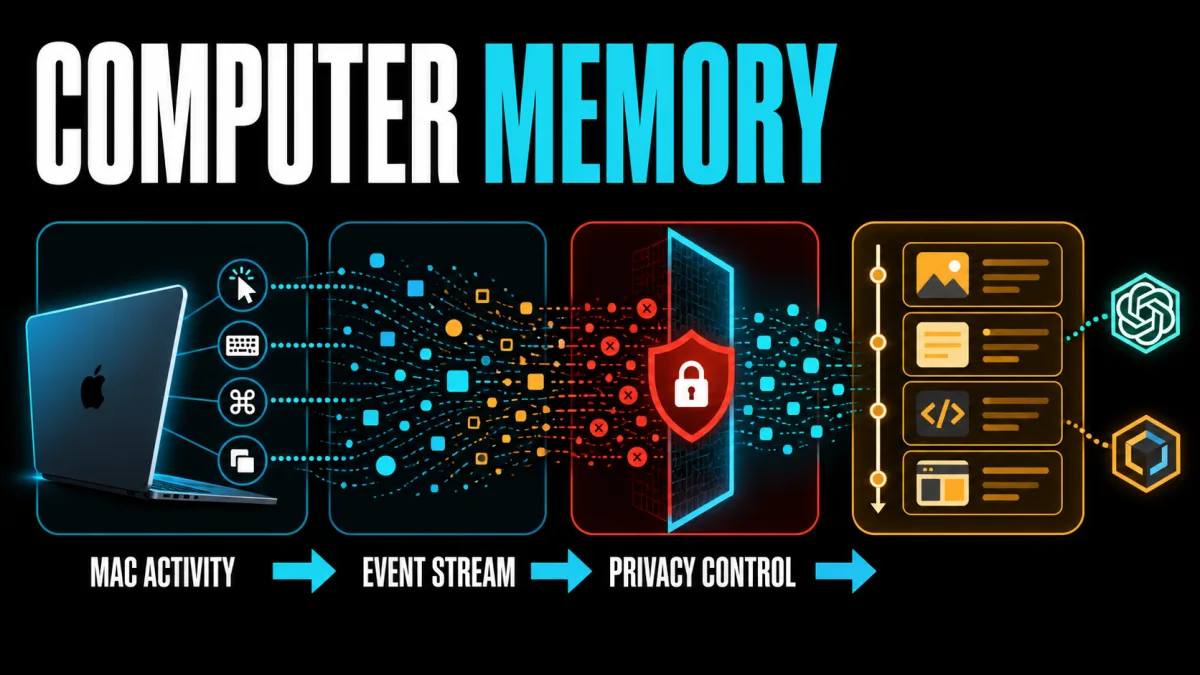
ChatGPT Computer History is an opt-in macOS feature that turns activity from allowed apps and websites into a timeline ChatGPT and Codex can use as context. The Verge reports that the feature can learn how someone works, suggest automations, and help continue tasks left unfinished, while OpenAI describes the underlying data as interaction events rather than screenshots.
Definition: ChatGPT Computer History is a macOS activity timeline built from allowed interaction events such as clicks, typing, shortcuts, and app switches.
Example: ChatGPT can use the timeline to identify a document someone edited earlier, then help continue the work without requiring the person to remember the filename.
Key takeaway: The feature gives an AI assistant memory of computer activity, but it also makes permissions, consent, local storage, and prompt injection part of the product decision.
Business impact: ChatGPT Computer History lets teams recover work context and spot repeatable workflows across allowed apps and websites, but teams must decide which sources the feature may observe before enabling it.
What changed with ChatGPT Computer History?
ChatGPT Computer History adds an activity-memory layer to the ChatGPT desktop app for macOS. OpenAI says the feature converts activity from allowed apps and websites into memories and a timeline that ChatGPT and Codex can reference, so a user can ask what they were doing before a break or locate a recent document. The practical change is to make computer context available to an AI agent instead of leaving that context only in the user's head; teams should evaluate it as a new permission boundary, not just a convenience toggle.
The Verge's report places the launch alongside a short OpenAI demonstration in which the app finds the last document someone edited, checks whether it was shared in Slack, and produces a recap of the morning. That example shows the intended value: Computer History can connect activity across applications so ChatGPT can identify a task or source before taking the next step. For the broader difference between an AI that answers and one that completes multi-step work, see what an AI agent actually does.
What does Computer History record on a Mac?
OpenAI says Computer History creates an interaction-event stream from allowed apps and websites, including clicks, typing, keyboard shortcuts, app switches, and context exposed through macOS accessibility features. OpenAI also says Computer History does not capture screenshots, screen recordings, microphone input, or system audio, and it never includes private-mode web browsing. The takeaway is precise but important: Computer History observes structured activity signals that can describe work without storing a continuous recording of the screen.
The distinction from OpenAI's earlier Chronicle research preview matters because Chronicle used screenshots, while Computer History is built around events and text summaries. The Decoder's coverage notes that the events are periodically converted into Markdown memory files and shown in a timeline grouped by day and time. Operators should therefore ask what an event stream can reveal about a process, not only whether a product stores images.
Is ChatGPT Computer History opt-in or automatic?
ChatGPT Computer History is off by default for Pro, Business, and Enterprise users in the macOS desktop app, according to OpenAI's Computer History documentation. Pro users must enable it themselves; Business and Enterprise workspaces require an administrator to grant access before each person can opt in, and the feature also requires Memories. The immediate action for a company is to define an approval policy before users begin connecting communication, finance, health, or other sensitive apps.
OpenAI says Computer History is not currently available in the EEA, Switzerland, or the United Kingdom, so regional availability is a real deployment constraint rather than a minor account setting. Users can choose which apps and websites contribute, pause or resume collection from the macOS menu bar, and inspect or delete timeline entries. A responsible rollout should begin with a narrow allowlist, a documented pause procedure, and a review of what the resulting memories contain.
What are the privacy and security trade-offs?
Computer History keeps temporary event files on the Mac inside the ChatGPT app group and leaves generated memory files on the local filesystem until the user deletes or clears them, OpenAI says. The documentation also says the memory files are plain-text Markdown and are not encrypted by Computer History, while the temporary events are processed on OpenAI's servers to generate memories. That combination means an organization has two separate controls to review: the vendor's processing and retention statements, and local access to the Mac account and its stored memory files.
OpenAI's documentation warns that Computer History increases prompt-injection risk because content from apps and websites can influence what ChatGPT or Codex sees as context. OpenAI also advises pausing collection during communications unless everyone involved has given express consent and excluding apps with sensitive personal, health, or financial information. This makes the feature relevant to the same production controls used for other AI agent security decisions: narrow permissions, explicit owners, reviewable outputs, and a clear human checkpoint for consequential actions.
Can Computer History turn activity into automations?
Computer History can suggest a reusable skill or automation when it identifies repeatable work, and OpenAI says Codex can create that workflow from the recorded activity. The feature can also help find recent documents, summarize a day's tasks, or recover context after a break. The business opportunity is therefore not only remembering what happened; it is converting observed work into a candidate process that an AI agent can repeat.
ChatGPT Computer History's automation path needs review because the recorded activity can contain incidental steps, hidden permissions, or assumptions that are safe for one person but wrong for a team. OpenAI says the feature can turn repeatable activity into a suggested skill or automation, so businesses should test one low-risk workflow, inspect the generated skill, and expand access only after the inputs, permissions, and failure cases are understood. A computer-level agent already represents a broader surface than a chatbot; Perplexity's Windows computer agent shows the same market direction from another vendor.
What should businesses watch next?
ChatGPT Computer History changes the unit of AI assistance from a prompt to a person's recent computer context. OpenAI's documentation shows the feature can connect activity to files, conversations, and repeatable workflows, while the same documentation limits it through opt-in controls, app and website permissions, pause and delete actions, and regional restrictions. The next meaningful test is whether those controls remain understandable when the feature is used across real work rather than a product demo.
For now, the safest conclusion is that Computer History is useful memory with a larger privacy surface. Users should enable it only for sources they are prepared to let ChatGPT observe, verify the local memory files and retention behavior, and keep it paused around sensitive conversations. OpenAI's feature may make an AI assistant better at resuming work, but the value depends on whether the surrounding permission and review practices are strong enough to make that memory trustworthy.
Frequently asked questions
What does ChatGPT Computer History record?
ChatGPT Computer History records interaction events from the apps and websites a user allows, including clicks, typing, keyboard shortcuts, app switches, and context exposed through macOS accessibility features. OpenAI says it does not capture screenshots, screen recordings, microphone input, or system audio, and private-mode browsing is excluded. The distinction is important: Computer History is an activity timeline built from events and summaries, not a continuous video recording of the Mac screen. Users should still treat the feature as sensitive because the events can describe work, communications, and documents in enough detail to create useful memories.
Is ChatGPT Computer History turned on automatically?
No. OpenAI says Computer History is off by default for ChatGPT Pro, Business, and Enterprise users in the macOS desktop app. Pro users must turn it on themselves, while Business and Enterprise workspaces also need an administrator to grant access before each user can opt in. The feature additionally requires Memories and is not currently available in the EEA, Switzerland, or the UK. Teams should therefore treat rollout as a policy decision involving workspace access, individual consent, and regional availability rather than as an automatic product update.
Where does Computer History store the activity it collects?
OpenAI says temporary interaction-event files stay on the Mac inside the ChatGPT app group before ChatGPT and Codex delete them. The generated memory files remain locally until the user deletes or clears them, and OpenAI's documentation says those plain-text Markdown files are not encrypted by Computer History. OpenAI processes the temporary events on its servers to create memories, then says it does not retain those event files after processing unless required by law. Users and employers should review both local account access and OpenAI data controls before enabling the feature.
Can Computer History create automations from my activity?
Yes. OpenAI says Computer History can identify repeatable work in the timeline and suggest a reusable skill or automation, which Codex can then create from the recorded workflow. The same history can help ChatGPT find a recently edited document, summarize a workday, or help a user resume a task after a break. Those capabilities make the feature more than a searchable log: they turn observed activity into context for an AI agent. Users should review every suggested workflow before reusing it because a history-derived automation can encode the permissions and assumptions of the original task.
Alex
Founder & Lead AI Writer
Alex is the founder of Yowox and lead AI writer since 2024, breaking down complex information into clear, actionable insights for thousands of readers every day. Alex has built AI automation systems for businesses since 2024, focusing on AI agents, workflow automation, and business process optimization.
Save hours. Save thousands.
Practical guides, real workflows, and the latest AI and automation news that matters — straight to your inbox.


