By Alex
 Best Privacy-Focused AI Tools in 2026: Local, Anonymous, and Cloud Options
A practical guide to privacy-focused AI tools, from fully local model runners to anonymous cloud assistants, with the trade-offs that privacy policies often hide.
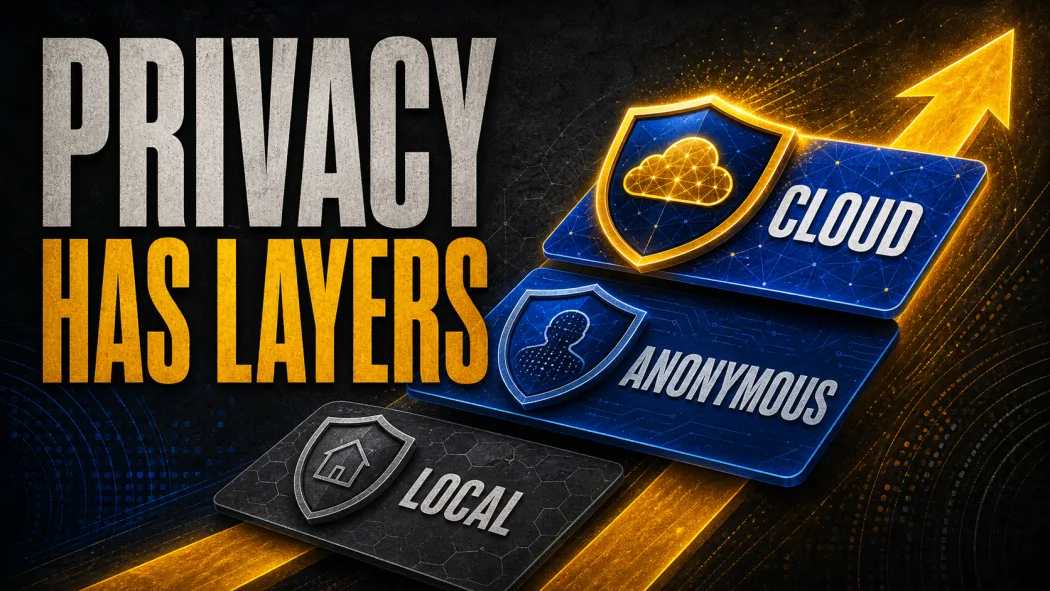
The best privacy-focused AI tool is the one whose data path matches your threat model. Use Ollama or another local runner when prompts and files must stay on your hardware; use Proton Lumo when you want a cloud assistant with a documented no-logs and no-training position; use Duck.ai when anonymous access to multiple models matters. Privacy is not a single product feature: it is the combination of where inference happens, what gets retained, who can identify the user, and which optional features are enabled.
Definition: A privacy-focused AI tool minimizes unnecessary collection, retention, training use, identity linkage, and third-party exposure.
Example: A local Ollama model can process a confidential draft without sending the prompt to a model provider, while Duck.ai can anonymize a cloud request before routing it to a selected model.
Key takeaway: Compare the complete data path, not only the vendor's privacy headline.
Business impact: A clear privacy boundary lets a team decide which AI tasks are safe to automate, which require review, and which must remain local.
What makes an AI tool privacy-focused?
Privacy starts with the inference boundary. If a model runs locally, prompts and attached documents can remain on the device; if a cloud model answers the request, the provider must receive at least enough data to generate a response. Privacy Guides makes the same distinction in its AI-chat criteria: local execution avoids sharing chat data with third parties, while a cloud service introduces a provider relationship that must be evaluated. Use the boundary as the first filter before comparing interfaces or model quality.
Retention is the second boundary to check for Ollama, Proton Lumo, Duck.ai, and every other tool in this guide. Privacy Guides' AI-chat criteria make the same distinction between a provider relationship and local execution: a service may promise not to train on your prompts while still storing conversations, metadata, uploaded files, or account activity. Before choosing a tool, ask four separate questions: Is the prompt stored? Is the response stored? Is either used for training? Can the request be linked to an identity? “No training” answers only one of those questions.
Optional features can change the answer. DuckDuckGo's Duck.ai policy documents caching, moderation, voice, and feedback exceptions, while Brave's Leo policy treats browser context as an opt-in data path; web search, file uploads, cloud models, synchronization, plugins, and analytics can create similar changes. Treat the private default as a starting configuration, then inspect every feature you plan to turn on before using sensitive material.
Quick comparison: The table below is a decision aid, not a universal ranking. “Best” means the tool has the clearest fit for the stated privacy goal, while every option still has operational trade-offs.
| Tool | Best fit | Strongest privacy boundary | Main trade-off |
|---|---|---|---|
| Ollama | Local model serving for developers | Local runs do not send prompts or data to Ollama; cloud can be disabled | You own model selection, updates, access control, and hardware |
| Jan | Local desktop chat with a simple interface | Jan says it does not log chats and supports local models that keep data on the device | Cloud models still see messages through their own providers |
| LM Studio | Local desktop model testing | Local chats, histories, and documents can stay on-device and offline | Model downloads, updates, and optional cloud features still use the network |
| AnythingLLM | Local documents, RAG, and agents | Desktop messages, histories, and documents are local by default | Optional telemetry and the connected model/provider determine the full boundary |
| Proton Lumo | Privacy-first cloud assistant | Proton says chats are not logged or used for training and saved history uses zero-access encryption | It is still a hosted service and its privacy claims are vendor-operated |
| Duck.ai | Anonymous access to multiple cloud models | DuckDuckGo removes identifying metadata and imposes provider retention/training rules | Provider-specific exceptions and optional uploads or voice still matter |
| Brave Leo | Private AI inside a browser | Brave says there are no server-side chat logs and no login is needed for free Leo | Browser context is an explicit feature boundary; local history and opt-ins need review |
Ollama is the best starting point for local model control
Ollama is the strongest default when the requirement is simple: run an open-weight model on your own machine and keep prompts away from the hosted service. Ollama states that local runs do not send prompts or data back to Ollama, and its documentation provides a local-only mode that disables cloud features. Choose it when developers can manage model files, hardware, updates, and the local API themselves.
The privacy advantage is also the responsibility. A local Ollama server binds to localhost by default, but a team can expose it to a network through configuration or a proxy. That turns a personal local tool into a service that needs authentication, network controls, logs, and access boundaries. Keep the server private, verify downloaded model files, and disable cloud features when the policy requires a local-only path.
Ollama's FAQ makes the same boundary clear: Ollama is a runtime, not a complete privacy program. It gives you a strong inference boundary, but it does not decide whether a model is trustworthy, whether a plugin can read files, or whether your backups are encrypted. For a business workflow, treat the local model as one component in the AI automation stack, not as a replacement for permissions and evaluation.
Jan is an easy local desktop choice
Jan is a good fit when a person wants local chat without building a command-line workflow. Jan says its privacy approach includes no prompt logging, no conversation monitoring, no file scanning, and no model tracking, while its local-model path keeps messages on the user's machine. Use Jan with a local model when the goal is a private desktop assistant, and remember that cloud models still send messages to the provider that runs them.
LM Studio is an easy local desktop choice
LM Studio makes a local-first trade-off with a visual interface. Its privacy policy says the desktop app can run entirely on-device and offline, with local messages, histories, and documents remaining on the system; it separately describes transient processing for optional cloud services and web search. Pick LM Studio when model discovery, desktop testing, and a visual local interface matter more than an automation-first API, and confirm the selected model is local before using it for confidential work.
AnythingLLM is the best local option for documents and RAG
AnythingLLM is the strongest fit when privacy-sensitive work means documents, retrieval, or an agent workspace rather than a blank chat window. Its documentation positions the product as an all-in-one application for local LLMs, RAG, and AI agents, while its desktop privacy policy says messages, chat histories, and documents are not transmitted by default and that telemetry can be disabled. Use AnythingLLM when you want a local document assistant, but keep both the LLM and embedding model local if source documents must not leave the device. More on this: Token Saver sends Claude only the PDF pages that matter.
AnythingLLM's desktop privacy policy is the relevant boundary here: the word “local” still depends on the connected model and embedding configuration. A document can stay on the device while a remote model receives the extracted text if the workspace is configured with a cloud provider. Keep the LLM, embedding model, vector store, and application on the same controlled machine when the requirement is that source documents never leave it.
AnythingLLM's desktop privacy policy also sets the access-control limit: privacy and access control are different goals. A local workspace may prevent a provider from seeing the data, but it does not automatically prevent another user on the machine from opening the files. Use operating-system accounts, disk encryption, least-privilege permissions, and a backup policy alongside the application.
Proton Lumo is the strongest privacy-first cloud assistant
Proton Lumo is the clearest cloud option for people who want a hosted assistant without accepting ordinary chat-retention defaults. Proton says Lumo erases request data after processing, does not use chats to train models, does not share chat data, and stores saved history with zero-access encryption. It also says its models run on servers Proton controls and that optional web search can be enabled when current information is needed. Use Lumo for writing, summarization, and research when a cloud service is acceptable but training and chat logging are not; for regulated or contractual data, verify the current plan, terms, retention behavior, and organizational approval before treating it as an approved processor.
Lumo's architecture solves a different problem from Ollama. You do not operate the model server or download model files, but you accept Proton's service, infrastructure, jurisdiction, and product controls. That can be the right trade when a user wants a polished assistant and a documented privacy position without maintaining local hardware. It is not the same as on-device inference, and a privacy policy is not an independent security audit. Related reading: When AI Conversations Become Public: An Analysis of DeepSeek Shared Links.
Duck.ai is the best anonymous multi-model option
Duck.ai is useful when the user wants to compare or access several cloud models without exposing a personal IP address and identity directly to each provider. DuckDuckGo says it anonymizes requests, strips identifying metadata before routing them, and has agreements requiring providers not to train on Duck.ai conversations and to delete prompts and responses under defined rules. Some models also have a zero-provider-visibility label backed by a trusted execution environment. Choose Duck.ai for low-friction questions, comparisons, and model experimentation when anonymity is more important than local control; do not treat that default as permission to upload secrets, identity documents, customer files, or medical records.
The benefit is anonymity at the routing layer, not local execution. The selected model still processes the request, and DuckDuckGo documents exceptions such as short-term prompt caching, legal or abuse-related retention, and moderation handling for uploaded files. Voice sends audio to the relevant provider when enabled, and optional feedback sharing creates a different data path from ordinary chat. The correct comparison is “anonymized cloud request versus direct cloud request,” not “cloud versus no cloud,” so choose Duck.ai only when the routing layer is sufficient and local inference is not required.
Brave Leo is the best browser-integrated private assistant
Brave Leo fits users who want AI beside the web pages they already read. Brave says Leo does not retain server-side chat logs, does not use conversations for training, and can be used without an account on the free tier. Brave also says chat history is local to the device, can be temporary, and can be disabled entirely. Use Leo when the privacy need is account-free, no-log assistance around public web content; use a local tool instead when the AI must process private documents or browser sessions that cannot leave the device.
The browser integration is both the advantage and the boundary. A standalone prompt may have a narrow data path, while a page-summary or tab-context feature can send additional content when the user explicitly enables it. Brave describes optional features as opt-in, but users should still inspect what context is being shared before asking Leo to summarize private pages, internal dashboards, or authenticated workspaces.
What about Mistral Le Chat for business use?
Mistral's data-training policy shows why plan selection matters. Mistral says input and output data are used by default to train its models on Free, Pro, and Education Vibe plans unless the user opts out. It says training is not applicable to Team and Enterprise plans, while its separate Zero Data Retention option is limited and not available for stateful products such as chat and agents. For business use, verify the exact plan, retention terms, region, and administrator controls before approving Le Chat for sensitive work.
How to choose a privacy-focused AI tool
Start with the data classification, not the model leaderboard. If the input contains passwords, access tokens, identity numbers, medical records, unreleased financial information, or confidential client material, the safest default is not to paste it into a consumer assistant at all. Redact the sensitive fields, use synthetic examples, or keep the entire workflow on an approved local or enterprise-controlled system.
Next, write the data path in one sentence. “A local model reads a file on an encrypted laptop” is a different risk from “a browser assistant sends the current tab to a hosted model” or “an anonymous router sends a prompt to a third-party provider under a deletion agreement.” If you cannot write the sentence clearly, you do not yet know whether the tool is private enough.
Finally, test the failure path. The site's AI automation stack guide uses the same operational boundary: ask what happens when the model needs web search, when a plugin reads a file, when a user enables memory, when logs are needed for debugging, when an employee leaves, and when the provider changes its plan terms. Privacy is part of the operational design of an AI agent, alongside permissions, evaluation, observability, and escalation.
A practical privacy-first shortlist
For the simplest local path, start with Ollama, Jan, or LM Studio and keep the selected model offline: their documented local modes keep prompts and documents on the device, while cloud toggles change that boundary. For local documents and retrieval, evaluate AnythingLLM with both its LLM and embedding model configured locally, because its desktop policy says messages, histories, and documents are local by default. For a cloud assistant, evaluate Proton Lumo when its documented no-logs and no-training position fits the data policy. For anonymous access to multiple cloud models, evaluate Duck.ai when the routing layer is sufficient and local inference is not required. For browser-adjacent public-web work, evaluate Brave Leo, whose no-log and account-free defaults are designed for that narrower context.
Do not turn that shortlist into a trust ranking. A tool can be excellent for anonymous public questions and wrong for confidential customer data. A local tool can be excellent for data residency and still be misconfigured with an exposed API. The best privacy-focused AI tool is the one whose default and optional data paths remain understandable after the first useful feature is enabled.
If you are deploying these tools inside a business workflow, start with a narrow pilot, define which data may enter the system, log only what the team actually needs, and require human approval for actions with legal, financial, customer, or security consequences. Privacy is not a one-time product choice; it is a boundary that must survive the whole workflow.
Need help designing a privacy-aware AI workflow? Get in touch.
Frequently asked questions
What is the best privacy-focused AI tool?
There is no single best tool because privacy can mean different things. Ollama, Jan, LM Studio, and AnythingLLM are stronger when you want prompts and files to stay on your own device. Proton Lumo is a strong cloud option because Proton says it does not log chats or use them for training. Duck.ai is useful when you want anonymous access to several model providers. Choose the tool whose data path matches your threat model rather than trusting a “private” label alone.
Is local AI always more private than cloud AI?
Local AI usually gives you the strongest control over prompts and documents because inference can happen on your own hardware, but it does not make the whole setup safe automatically. Model downloads, update checks, exposed local APIs, plugins, logs, backups, and remote model settings still matter. A local runner configured to use cloud models is no longer a fully local data path.
Is Duck.ai private if it uses models from OpenAI or Anthropic?
Duck.ai is designed to anonymize requests before sending them to model providers, and DuckDuckGo says its providers agree not to train on Duck.ai chats and to delete prompts and responses under defined rules. That is a different privacy architecture from sending a prompt directly to a provider, but it is not the same as local inference. Optional file uploads, voice, feedback sharing, and provider-specific retention exceptions still need to be considered.
Is Proton Lumo suitable for sensitive work?
Proton says Lumo uses a no-logs policy, zero-access encryption for saved chat history, and no training on chats. Those are useful protections for a cloud assistant, but users should still follow their organization's data classification rules, verify current terms, and avoid treating any third-party cloud service as a substitute for a formal security review.
Should a business use a free consumer AI tool for confidential data?
Not by default. A business should first verify retention, training, administrator access, region, subprocessors, deletion, auditability, and whether the plan actually covers the intended data. Mistral, for example, says input and output are used for training by default on its Free, Pro, and Education Vibe plans, while Team and Enterprise plans are opted out by default. The plan and configuration are part of the privacy decision.
Alex
Founder & Lead AI Writer
Alex is the founder of Yowox and lead AI writer since 2024, breaking down complex information into clear, actionable insights for thousands of readers every day. Alex has built AI automation systems for businesses since 2024, focusing on AI agents, workflow automation, and business process optimization.
Save hours. Save thousands.
Practical guides, real workflows, and the latest AI and automation news that matters — straight to your inbox.