 By Alex
 Cursor Router picks a model per request to cut cost
Cursor Router classifies each coding request and routes it to the model that best fits the task, with Cursor reporting frontier-quality performance and lower spend for teams and enterprises.
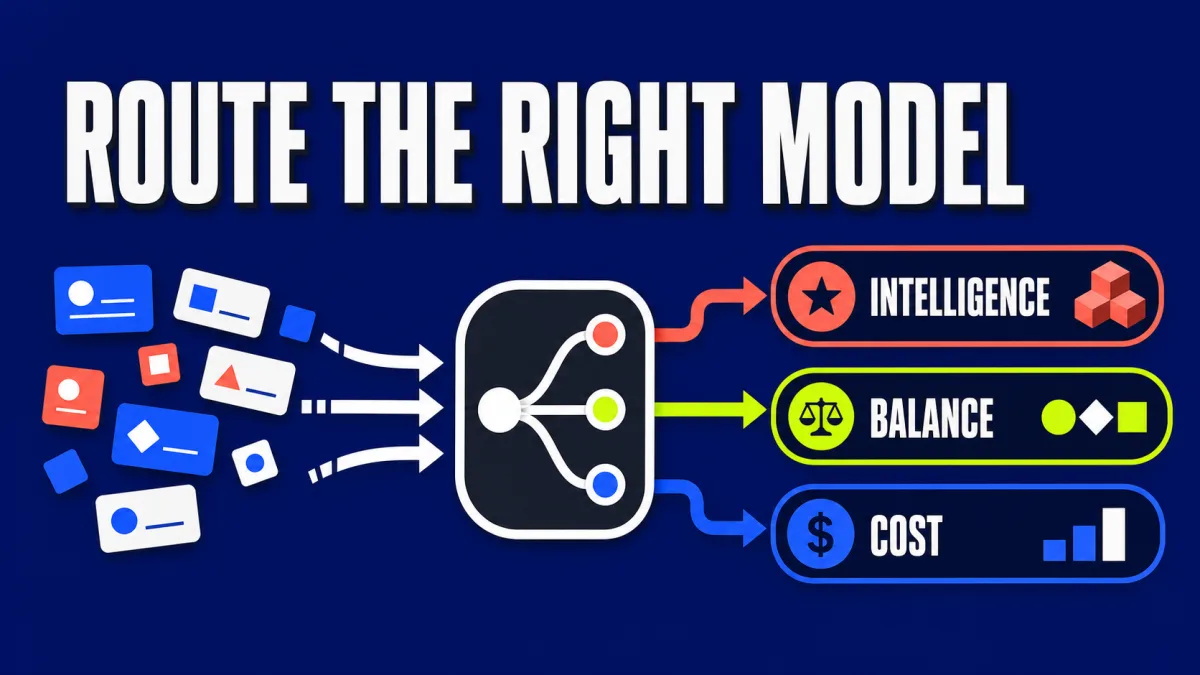
Cursor’s Cursor Router announcement frames model choice as a request-level optimization problem: simple coding work does not always need the most expensive frontier model, while complex, long-horizon work may. The company says its classifier was trained on more than 600,000 live requests and evaluated with online A/B tests across millions of requests.
The result is a model-routing layer for Cursor Teams and Enterprise plans. MarkTechPost’s report describes the launch as a way to preserve frontier coding quality while reducing the cost of routine requests. The savings figures are company-reported, so the useful question is not whether every team will save the headline percentage, but whether routing matches a team’s real workload.
What problem does Cursor Router solve?
Cursor says roughly 60% of its developers choose one model as a daily driver, which can send routine work through frontier-priced models. Cursor Router addresses that mismatch by classifying each request before inference and selecting a model according to task characteristics rather than a single standing preference.
That is a different product category from a fallback chain. A fallback waits for an error and retries elsewhere; Cursor Router makes a routing decision before the selected model runs. The intended economic gain comes from moving easy work away from frontier pricing while preserving stronger models for tasks that need them.
How does Cursor Router classify a request?
Cursor says Cursor Router analyzes four request signals: the query, context, task complexity, and domain. It combines those signals with learned knowledge of how different models behave, then applies a task-to-model decision such as price-efficient models for simple work, models with stronger UI taste for interface changes, and frontier reasoning models for complex long-horizon problems.
The classifier is trained on more than 600,000 live requests and optimized for user satisfaction, which Cursor refers to as AFC in its announcement. Cursor also says it evaluates the router in online A/B tests across millions of live requests rather than relying only on small offline datasets.
What are Cursor Router’s three modes?
Cursor Router exposes three modes on the cost–intelligence frontier. The modes let a team choose how aggressively it wants to trade model capability for lower spend, instead of forcing every user into one global routing policy.
| Mode | Cursor’s stated priority | Practical fit |
|---|---|---|
| Intelligence | Frontier quality | Difficult engineering tasks where capability matters most |
| Balance | Strong quality at a lower spend rate | General team coding with a controlled cost–quality trade-off |
| Cost | Token efficiency | Routine or repeatable work where the cheapest capable route is preferred |
Cursor does not publish a universal model map for each mode because the route can change with the request and the available models. That makes the mode a policy setting, not a promise that every request will use one named model.
What savings does Cursor report?
Cursor reports two different savings results. In online A/B tests across millions of requests, the company says Cursor Router delivered frontier-quality performance at 60% savings. In early access, three high-volume accounts with thousands of users saved 30%–50% on Auto-routed requests versus routing the same traffic entirely at Opus 4.8 API rates, with no reported decrease in quality.
Cursor also reports cost-per-commit observations from its early-access measurement. Auto Intelligence was measured at $6.76 per commit and Auto Balance at $4.63, compared with $7.34 for Opus 4.8 and $12.69 for Fable 5. These figures are observed unit costs under Cursor’s measured workload, not a forecast for every repository or task mix.
The distinction matters for procurement. A team that mostly performs long-horizon debugging may route differently from a team doing small edits and documentation. The classifier can lower the blended cost only when the workload contains enough requests that do not need the most expensive model, and the quality comparison must hold for that team’s own acceptance criteria.
Why does cache awareness matter?
Cursor says Cursor Router is cache-aware in both training and evaluation because changing models can create prompt-cache misses. The company trained the router on data where routing causes cache misses and included the cost of those misses in its reported savings.
That detail makes the cost claim more credible than a calculation based only on each model’s listed token price. A request-level router changes not just the model fee but potentially the amount of reusable context. Teams evaluating a similar system should measure cache hit rate, context duplication, latency, and rework alongside nominal model prices. Related reading: Ramp Router brings model routing to AI teams.
How can teams administer Cursor Router?
Cursor says Router is available for Teams and Enterprise plans across desktop, web, iOS, CLI, and the Cursor SDK. Administrators can enable it by team or group, choose which optimization modes members can select, set a default mode, and use model allow or block lists.
The rollout controls matter because routing changes the relationship between a developer and the model picker. A team can standardize on Auto while still deciding whether the organization should prioritize Intelligence, Balance, or Cost. Cursor’s broader strategy is also visible in its earlier model-neutral and agent-focused product direction: the company is positioning itself as a layer that chooses among models, not only as a client for one provider.
What should teams measure before adopting routing?
Teams should compare routed and fixed-model traffic using the same code-review and acceptance process. Cursor’s public metrics suggest a useful evaluation frame: user satisfaction, keep rate, cost per request, cost per commit, cache misses, and the amount of generated code that remains in the codebase.
The most important guardrail is task-level quality. A lower bill is not a saving if developers spend the difference correcting generated code, rerunning agents, or manually recovering context after a model switch. Teams should segment results by task type—small edits, UI changes, implementation, debugging, and long-horizon work—rather than averaging all requests into one score.
Is Cursor Router a guaranteed 30–50% saving?
No. The 30%–50% figure comes from Cursor’s early-access comparison of three high-volume enterprise accounts, while the 60% figure comes from Cursor’s online A/B testing. Those measurements show the potential of request-level routing under Cursor’s conditions, not a guaranteed result for every organization.
The more durable lesson is architectural: model selection can become a workload optimization layer. Cursor Router keeps frontier models available for hard tasks, moves routine work toward cheaper routes, and measures the trade-off against real production behavior. Teams should validate that trade-off on their own repositories before treating the headline savings as a budget assumption.
Frequently asked questions
What is Cursor Router?
Cursor Router is a request-level classifier for Cursor Teams and Enterprise users. It analyzes a request before a model runs, using the query, context, task complexity, domain, and learned information about model behavior. Cursor then routes the request to a model it believes is the best fit, rather than sending every task to one manually selected daily-driver model.
How much can Cursor Router reduce coding costs?
Cursor reports different savings for different measurements. In online A/B tests across millions of requests, Cursor says Router delivered frontier-quality performance at 60% savings. During early access, three high-volume enterprise accounts saved 30% to 50% on Auto-routed requests compared with routing all traffic at Opus 4.8 API rates. These are Cursor-reported results, not an independent benchmark or a guarantee for every team.
Which modes does Cursor Router offer?
Cursor Router offers Intelligence, Balance, and Cost modes. Intelligence prioritizes frontier-level capability, Balance targets a middle point between quality and spend, and Cost prioritizes token efficiency while still seeking useful output. Teams can set defaults, restrict available modes, and manage rollout by team or group.
Does Cursor Router switch models during a conversation?
Cursor describes Router as classifying each request before selecting a model, so routing can change as the task changes. Cursor also says the system is cache-aware because switching models can create cache misses. Its reported savings include the cost of those misses, which is important because a router that ignored them could overstate its real economic benefit.
Alex
Founder & Lead AI Writer
Alex is the founder of Yowox and lead AI writer since 2024, breaking down complex information into clear, actionable insights for thousands of readers every day. Alex has built AI automation systems for businesses since 2024, focusing on AI agents, workflow automation, and business process optimization.
Save hours. Save thousands.
Practical guides, real workflows, and the latest AI and automation news that matters — straight to your inbox.


