By Alex
 Harness, loop and graph: three layers of agent reliability
Harness, loop and graph engineering solve different reliability problems in agent systems. Here is how the layers fit together, when each matters, and why the order of operations is more important than the buzzwords.
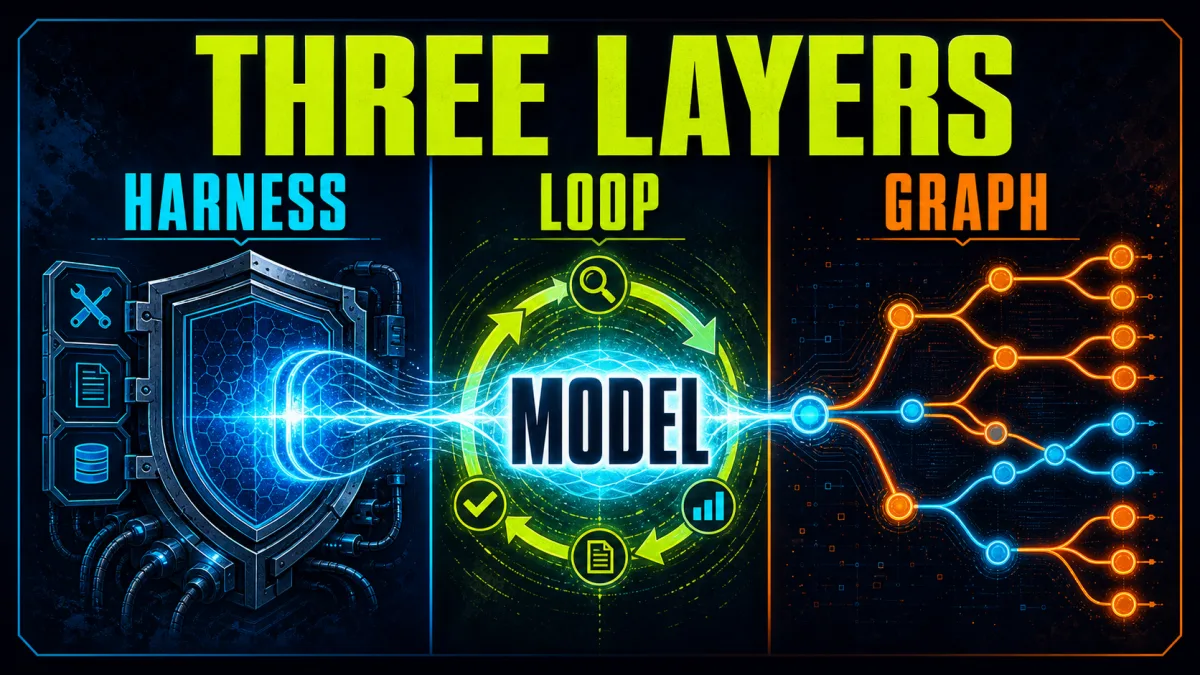
Harness engineering, loop engineering and graph engineering are three different ways to make an agent system reliable. The harness gives a model a working environment; the loop turns one action into an iterative, verifiable process; the graph makes multi-step control flow explicit. They overlap in software, but they answer different questions.
The distinction matters because many “agent failures” are not model failures. A model may be blamed for a bad result when it had no durable state, an ambiguous tool, an unbounded retry path or no independent verification. The practical framework in the Towards AI comparison is useful precisely because it moves the discussion from model capability to system responsibility. The labels are still emerging rather than a universal standard, so the definitions below should be read as an engineering map—not a standards document.
Short version: the harness makes the model operate, the loop makes work repeatable and verifiable, and the graph makes complex control flow inspectable.
Why these layers get confused
All three layers sit around the same model and may contain code that calls the model repeatedly. A harness can contain a loop. A graph can contain several loops. A loop can run inside a harness without any graph framework at all. That overlap makes the terms sound interchangeable even when the design decisions are not.
A useful boundary is to ask what can be changed without changing the other layers. Add a filesystem, permission gate or trace collector and you changed the harness. Add an evaluator that sends failed output back for another attempt and you changed the loop. Add a branch that routes failed verification to a human reviewer instead of another retry and you changed the graph.
This is not merely vocabulary. Each layer has a different failure mode and a different debugging question:
| Layer | Main question | Typical failure | Primary design lever |
|---|---|---|---|
| Harness | What can the model see and do? | Missing context, unsafe tools, lost state | Tools, permissions, memory, runtime and observability |
| Loop | What causes another attempt, and when does it stop? | Premature exit, blind retries, runaway work | Evidence, feedback, budgets and stopping rules |
| Graph | What component is allowed to run next? | Hidden branching, bad handoffs, unrecoverable state | Nodes, edges, state transitions and recovery routes |
What is agent harness engineering?
Agent harness engineering designs the machinery that turns a base model into an operating system for work. It includes the code, configuration and execution logic around the model: system instructions, tools, filesystems, sandboxes, memory, model routing, middleware, permissions, handoffs, logs and verification interfaces.
A raw language model can generate a response, but it cannot independently maintain a project workspace, run a test suite, inspect a browser, enforce an approval policy or resume a failed job. Those capabilities come from its environment. In her survey of harness engineering, Lilian Weng describes the harness as the surrounding system that orchestrates execution, tool use, context, artifacts, state and evaluation. That framing is more useful than treating a harness as a particularly elaborate prompt. More on this: Context Engineering vs Prompt Engineering: Harness Wins.
The harness also defines the agent’s authority. A tool that can read one directory is a different capability from a shell with network access. A memory file that stores task state is different from a chat transcript that disappears when the context window ends. A human approval hook is different from an instruction asking the model to “be careful.” These are runtime properties, not prompt aesthetics.
The harness checklist
A minimal production-minded harness should answer five questions:
- Context: What information is injected, retrieved or deliberately excluded?
- Action: Which tools can the model call, and what do they actually permit?
- State: Where do progress, artifacts, failures and decisions survive?
- Policy: Which actions require deterministic blocking or human approval?
- Evidence: How can an operator inspect what happened and why?
The best harness is task-specific. A research agent needs source retrieval, citation tracking and a way to distinguish evidence from inference. A coding agent needs a repository, filesystem tools, test execution and a diff boundary. A customer-support agent needs account permissions, policy checks and escalation. Copying a large harness across unrelated tasks can add tools, context and failure surface without adding useful capability. More on this: Agent Auditing Engine Tests More Than Final Answers.
For a concrete example of the scaffolding distinction, see Yowox’s breakdown of an open-source coding-agent harness. The model and the harness are separate layers: the harness determines how a configured model receives context and dispatches tools.
What is loop engineering?
Loop engineering designs the repeated work-and-feedback cycle that moves an agent from an initial attempt to a verified outcome. The smallest loop is a model calling a tool, observing the result and deciding what to do next. A more reliable loop adds an explicit goal, external evidence, bounded retries and a stopping rule.
LangChain’s practical explanation of loop engineering describes a stack that can include the core agent loop, a verification loop, an event-driven loop and an outer improvement loop. The important idea is not the number of loops. It is that feedback has somewhere concrete to go. Background: Loop Engineering: Better Feedback Is Not Enough.
A useful loop contract contains:
- Trigger: What starts the cycle?
- Goal: What observable state counts as success?
- Action policy: What may the agent change, call or delegate?
- Evidence: Which tests, schemas, citations, metrics or human checks evaluate the result?
- Feedback: What specifically failed, and what can the next attempt change?
- Stop rule: What ends the loop on success, timeout, budget exhaustion or escalation?
The rule worth remembering is simple: loop on evidence, not confidence. “The model says it is done” is not a reliable terminal condition. “The tests pass, required links resolve, the schema validates and a reviewer approves the sensitive action” is evidence that can end a cycle.
The four useful loop shapes
Agent loop. The model chooses actions, receives tool results and repeats until it reaches a task condition. This is enough for many short workflows.
Verification loop. An external grader checks the output and returns actionable feedback. The grader may be deterministic—tests, lint, schemas—or model-based, but a model judging itself without independent evidence is a weak boundary.
Event loop. A schedule, webhook, new document or system event triggers the agent. The agent is no longer a manually invoked chat; it is a component in an operating system.
Improvement loop. Traces and failure cases become evaluation data. The team changes the harness or workflow, reruns the evaluation and keeps a change only when it improves the target without unacceptable regressions.
The loop should stay bounded. Maximum iterations, timeouts, token budgets, no-progress detection and escalation are not signs that the agent is less intelligent. They are the controls that keep an autonomous process from converting uncertainty into unbounded cost or side effects.
For a deeper practical treatment of goals, verification and persistence in coding-agent loops, see the existing Yowox guide to engineering loops.
What is graph engineering?
Graph engineering makes the workflow topology explicit: nodes perform work, edges define permitted transitions, and state moves through the system. A graph can express sequence, conditional branching, parallel fan-out, joins, retries, human interrupts and durable checkpoints.
A graph answers a question that a loop does not: which component is allowed to run next? A loop can tell one agent to keep working until a test passes. A graph can route a failed test to a repair node, send a policy-sensitive result to a human, run two independent checks in parallel and join their results before publishing.
LangGraph’s official overview positions it as a low-level orchestration runtime for long-running, stateful agents, with persistence, streaming, human-in-the-loop control and resumability. That is the graph layer’s value: making state transitions and execution paths visible enough to inspect, pause and recover.
What a graph engineer decides
- Node boundaries: Which work belongs in a deterministic function, an LLM call, a specialist agent or a human review step?
- State schema: What can each node read or update, and how are parallel updates merged?
- Routing: Which evidence sends work forward, backward, to a fallback or to escalation?
- Concurrency: What can run in parallel, and what must wait for a join?
- Cycles: Where are retries legal, how many are allowed and what makes them safe?
- Durability: Where are checkpoints stored, and how does execution resume after interruption?
A graph is not automatically better than a loop. If the task is “use three tools to answer one bounded request,” a graph can add ceremony and hide the simple behavior. Graphs earn their complexity when branches, approvals, parallel work, recovery or multiple stateful participants are meaningful parts of the task.
How do harnesses, loops and graphs fit together?
The layers nest rather than compete:
Harness: context + tools + state + permissions + observability
  └── Graph: nodes + edges + state transitions + recovery
        └── Loop: action + observation + verification + stopping
              └── Model calls and tool results
The graph runs inside the harness because it needs the harness’s state store, tools, policies and tracing. Loops live inside graph nodes because each node may need to iterate toward a local goal. The harness supplies the environment in which both can operate.
This nesting also gives a useful debugging sequence. If the model cannot access the file it needs, inspect the harness. If it edits the file but stops before tests pass, inspect the loop. If the repair step never runs after a failed test, inspect the graph. Changing the model first may be the wrong intervention in all three cases.
| Symptom | Start debugging here | Why |
|---|---|---|
| The agent lacks the right context or tool | Harness | The environment cannot support the intended action |
| The agent repeats work or stops too early | Loop | Feedback or termination is underspecified |
| A fallback or approval path never runs | Graph | The transition topology does not express the intended route |
| Work disappears after interruption | Harness and graph | State persistence and checkpoint boundaries are incomplete |
| Scores rise while real quality falls | Loop and harness | The evaluator or improvement boundary is overfitting |
When should you use each layer?
Start with the harness when the agent is not grounded in a usable environment. Give it narrow tools, clear context, durable artifacts and observable actions. Do not add more autonomy to compensate for missing infrastructure.
Add loop engineering when the task needs iteration, verification or asynchronous triggers. Define the desired outcome before writing the retry logic. If you cannot describe a pass condition that a test, evaluator or reviewer can check, the loop is not ready for production.
Add graph engineering when the workflow has meaningful topology. Use it for conditional routing, parallel specialists, human checkpoints, resumable jobs or explicit failure recovery. Keep the graph’s state schema smaller than the entire conversation and make every transition inspectable.
A practical rollout path is:
- One model, one narrow task and one minimal harness.
- One bounded loop with an external verification signal.
- Traces, budgets, permission boundaries and durable artifacts.
- A graph only when implicit control flow becomes difficult to test.
- Holdout evaluations and human review before expanding autonomy.
This order reduces a common architecture mistake: drawing a complicated graph before understanding the behavior that needs to live inside its nodes. A graph can make a bad loop easier to visualize without making it more reliable.
What should teams measure?
Reliability is more than whether the final answer looks plausible. Measure the outcome that matters for the task and the operational cost of reaching it:
- successful completion against a testable specification;
- verification pass rate and regression rate;
- retries, no-progress cycles and escalation frequency;
- tool-call errors and permission denials;
- time, tokens and external service cost;
- recovery success after interruption or node failure;
- human approvals, rejections and overrides;
- trace completeness for reproducing a failure.
Keep evaluation independent from the component being optimized. If a loop’s model is allowed to rewrite its own grader, the resulting score does not prove that the work improved. If a graph can silently skip a failed node, a successful final response does not prove that every required check ran.
The most useful failure record says what happened, where it happened and which layer owns the fix. “The agent was bad” is not an actionable diagnosis. “The tool returned an undocumented shape” points to the harness. “The verifier returned feedback but the next iteration ignored it” points to the loop. “The approval branch had no edge from the policy check” points to the graph.
The takeaway: engineer the boundary, not just the prompt
Harness, loop and graph engineering are complementary layers for turning model calls into dependable systems. The harness gives the model a controlled place to work. The loop makes progress iterative, evidence-based and stoppable. The graph makes complex execution paths explicit, routable and resumable.
The terms will continue to evolve, and teams will draw the boundaries differently. That is fine as long as each system documents its responsibilities. Start small, make the first loop verifiable, observe failures, then introduce graph structure only where the workflow demands it.
The goal is not to build the most elaborate agent architecture. The goal is to know which layer owns each failure—and to make the next run measurably better.
Frequently asked questions
What is the difference between harness, loop and graph engineering?
Harness engineering designs the runtime and environment around a model: context, tools, permissions, state, memory and observability. Loop engineering designs repeated execution with feedback, verification and stop rules. Graph engineering makes the workflow topology explicit through nodes, edges, branches, joins, cycles and recovery paths.
Does a graph replace an agent loop?
No. A graph usually contains one or more loops inside its nodes. The graph controls which component runs next; a loop controls how one component iterates toward a verified outcome. A graph is useful for branching, parallelism, approvals and recovery, but unnecessary for every simple tool calling task.
Should I build the harness, loop or graph first?
Start with a minimal harness and a bounded loop for one representative task. Add verification and observability before adding more autonomy. Introduce a graph when branching, parallel work, durable state or human checkpoints make implicit control flow hard to inspect.
Is agent harness engineering a standardized field?
No single industry-wide definition governs all three labels. The terms are useful working categories, but teams use them differently. Treat the responsibility each layer owns as more important than the label attached to it.
What is the practical reliability rule for agent loops?
Loop on evidence, not confidence. A test result, schema validation, citation check, diff, metric or human decision is a stronger stopping signal than the model saying that it is finished.
Alex
Founder & Lead AI Writer
Alex is the founder of Yowox and lead AI writer since 2024, breaking down complex information into clear, actionable insights for thousands of readers every day. Alex has built AI automation systems for businesses since 2024, focusing on AI agents, workflow automation, and business process optimization.
Save hours. Save thousands.
Practical guides, real workflows, and the latest AI and automation news that matters — straight to your inbox.