By Alex
 OpenClaw Explained: The Self-Hosted AI Gateway for Personal Agents
A practical, security-first guide to OpenClaw: its gateway architecture, channels, tools, skills, multi-agent routing, installation, deployment, and production operating model.
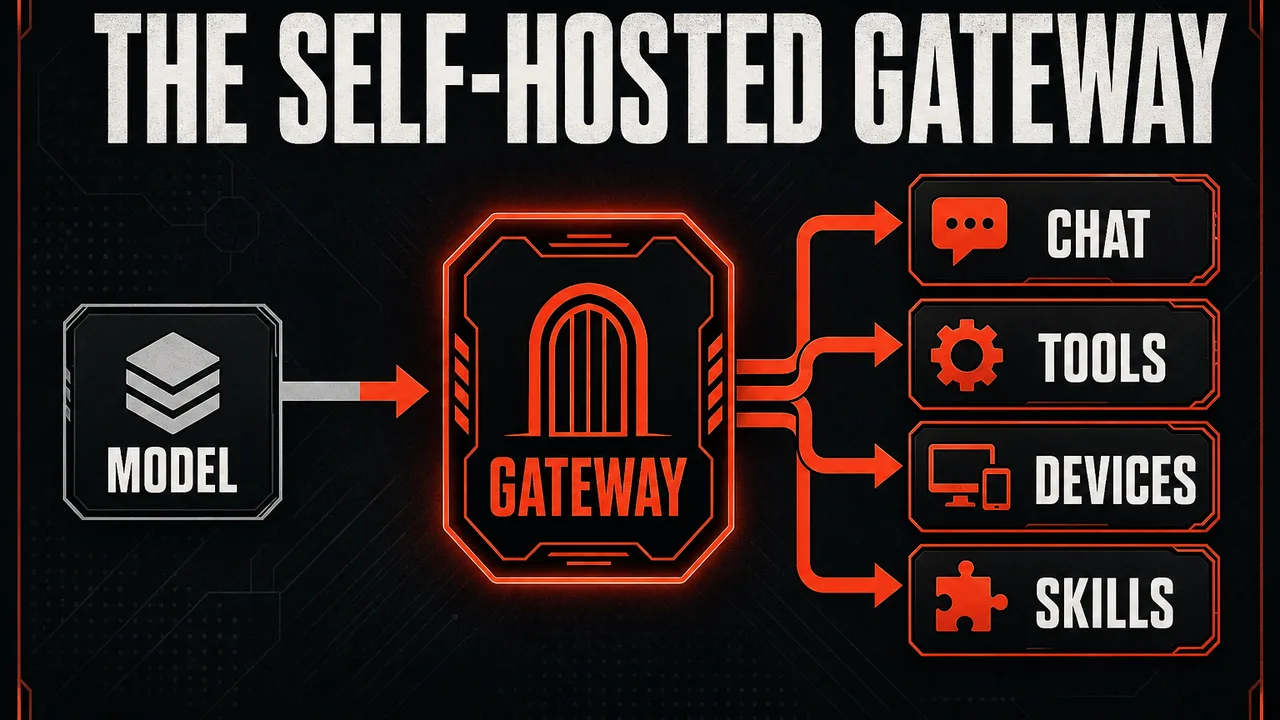
OpenClaw is best understood as the control plane for a personal AI agent, not as another chat interface or model provider. You run the Gateway on a machine you control, connect it to the messaging channels and devices you already use, choose a model, and give the agent a carefully bounded set of tools and skills.
Definition: OpenClaw is a self-hosted, multi-channel gateway that connects chat apps and device nodes to tool-using AI agents.
Example: A Telegram message can start a research task, the agent can browse sources and write files in its workspace, and OpenClaw can return the result to Telegram while keeping the session available for follow-up.
Key takeaway: OpenClaw centralizes channels, sessions, routing, tools, skills, and agent execution in one Gateway process.
Business impact: Self-hosting gives operators control over data and deployment, but it also makes them responsible for identity, network exposure, model choice, permissions, secrets, updates, and incident response.
What is OpenClaw?
OpenClaw is an open-source personal AI assistant runtime built around a long-running Gateway. The official documentation describes the Gateway as a bridge between messaging surfaces—including Telegram, WhatsApp, Discord, Slack, Signal, iMessage, Microsoft Teams, Matrix, Google Chat, and WebChat—and AI agents that can use tools and maintain sessions.
The distinction between a gateway and a chatbot matters. A chatbot is usually a product surface: open an app, type a prompt, receive a response. OpenClaw is infrastructure for an assistant that can remain available across channels. It accepts inbound events, identifies the relevant sender and conversation, selects an agent and session, assembles the model context, executes approved tool calls, and delivers the result through the connected channel.
OpenClaw is not itself a foundation model. It can work with supported model providers and subscriptions, while its own responsibility is orchestration. That includes routing, workspaces, memory-like session continuity, browser and device access, skills, plugins, scheduled automation, and channel-specific delivery. The underlying agent loop is the part that turns a model into an operational assistant; for a broader explanation of this distinction, see what an AI agent actually does. For how OpenClaw stacks up against a similar self-hosted framework, see Hermes Agent vs OpenClaw.
Why does OpenClaw use a Gateway?
The Gateway gives OpenClaw one control plane for many interfaces. Without a gateway, every channel integration, model call, session store, tool, and device would need to be coordinated separately. With a gateway, channels become inputs and outputs around a shared routing and execution layer.
The core flow looks like this:
Telegram / WhatsApp / Discord / Slack / WebChat
                    |
                    v
              OpenClaw Gateway
        routing · auth · sessions · events
                    |
        +-----------+-----------+
        |                       |
        v                       v
   AI agent runtime       tools and skills
        |                       |
        +-----------+-----------+
                    v
        files · browser · nodes · cron
The OpenClaw architecture documentation treats the Gateway as the single source of truth for sessions, routing, and channel connections. That design supports continuity: the same agent can be reached from a phone, a browser dashboard, a command line, or a companion device without each surface becoming a separate assistant.
The trade-off is concentration of authority. The Gateway may hold channel credentials, model credentials, session transcripts, tool policies, and access to the host. A misconfigured Gateway is therefore not just a broken chatbot; it can become a broadly reachable operator interface. OpenClaw’s security model must be designed before remote access and tool use are enabled.
What can OpenClaw do?
OpenClaw’s useful capability is the combination of messaging, context, tools, and persistence rather than any single feature. Its current documentation and repository describe several capability groups.
| Capability | What it provides | Typical use |
|---|---|---|
| Multi-channel messaging | Connectors for Telegram, WhatsApp, Discord, Slack, Signal, iMessage, Teams, Matrix, WebChat, and more | Ask the same assistant from different devices |
| Sessions | Conversation state and routing keys | Continue a task after the original message |
| Workspaces | Files and instruction files for an agent | Keep project context near the agent |
| Tools | Browser, filesystem, shell, process, nodes, cron, sessions, and channel actions | Turn a request into an executable workflow |
| Skills | Markdown instruction packages that teach tool use and procedures | Add repeatable capabilities without changing core code |
| Multi-agent routing | Separate agents, workspaces, policies, and sessions | Keep personal, work, and public assistants apart |
| Nodes | Paired macOS, iOS, and Android devices | Camera, screen, Canvas, voice, and device actions |
| Control UI | Browser dashboard for chat, configuration, sessions, and nodes | Operate the Gateway without a terminal |
| Automation | Cron jobs, webhooks, and event-driven flows | Run recurring or triggered tasks |
These capabilities are composable. For example, a daily reporting workflow can receive a scheduled trigger, use a restricted research agent, fetch source material, write a report into a workspace, and send a summary to a private Telegram chat. The quality and safety of that workflow depend less on the headline feature than on its model, tool policy, data boundaries, and failure handling.
How do channels and sessions work?
A channel is the transport surface through which OpenClaw receives and sends messages. A session is the context boundary that determines which previous messages, instructions, tools, and agent identity apply to a turn. These are related but not interchangeable.
A direct message, group conversation, WebChat thread, and CLI request may each map to different sessions depending on configuration. OpenClaw can also route accounts, channels, senders, or peers to distinct agents. This is important when one Gateway serves different trust boundaries.
For example, a sensible setup might use:
- a private personal agent with access to personal files and a browser profile;
- a work agent with access only to a project workspace and business channels;
- a public information agent with no shell, filesystem, browser, or control-plane tools;
- a research reader agent that can fetch and summarize untrusted pages but cannot modify files or send messages.
The multi-agent routing model is not a substitute for operating-system isolation. If mutually adversarial users share a Gateway host or can modify its configuration, they are inside the same operator trust boundary. For strong separation, use different OS users, hosts, containers, or Gateways.
How do you install OpenClaw?
The official project currently recommends Node 24, with Node 22.19 or newer supported for compatibility. Check the project’s installation documentation before deploying because runtime requirements and release channels can change.
The shortest recommended installation path is:
npm install -g openclaw@latest
openclaw onboard --install-daemon
openclaw gateway status
The onboarding command walks through Gateway setup, workspace creation, model authentication, channel configuration, and installation of a user-level service. On macOS this generally means a launchd-managed process; on Linux it can use a systemd user service. A daemon is preferable to a terminal process for an always-on assistant, while foreground mode remains useful for debugging:
openclaw gateway stop
openclaw gateway --port 18789 --verbose
The default local Control UI is available at http://127.0.0.1:18789/ after the Gateway starts. OpenClaw stores its primary configuration in ~/.openclaw/openclaw.json and maintains agent state, credentials, sessions, and workspaces beneath the OpenClaw state directory.
A source checkout is a different workflow. The official repository is a pnpm workspace, so development setup should use pnpm rather than treating the repository like a published npm package:
git clone https://github.com/openclaw/openclaw.git
cd openclaw
pnpm install
pnpm openclaw setup
pnpm ui:build
pnpm gateway:watch
Use the packaged npm installation for a normal deployment. Use a source checkout when you are contributing, debugging a release, developing a plugin, or testing changes against the project’s development loop.
How do you connect Telegram or another channel?
Channel setup is deliberately separate from installing the Gateway. The general pattern is:
- Create or obtain the channel credential using the channel provider’s official process.
- Add the channel configuration to OpenClaw through onboarding or
openclaw.json. - Start or restart the Gateway.
- Keep inbound access on pairing or an allowlist.
- Test with one trusted sender before enabling groups or broad delivery.
- Check logs and
openclaw doctorif messages do not arrive.
Telegram is a common first channel because it provides a bot-based integration and works well for personal assistants. WhatsApp, Discord, Slack, Signal, iMessage, and other channels have different authentication and event models, so do not copy a Telegram configuration into another connector. Use the channel-specific OpenClaw documentation for the current fields and setup sequence.
The most important channel setting is not the token. It is who may trigger the agent. OpenClaw’s documented default for many DM-capable channels is pairing: an unknown sender receives a short code, and the Gateway does not process the message until an operator approves that sender. An allowlist is stricter when the approved identities are known in advance. Public inbound DMs require an explicit opt-in and should be treated as a high-risk configuration when tools are enabled.
Groups need a second layer of protection. Use a group allowlist and require a mention unless every participant is inside the same trust boundary. A group chat is not merely a larger DM: it introduces more untrusted content, more social engineering, more accidental context sharing, and a greater chance that the agent will act on a message the operator did not intend as an instruction.
What are OpenClaw tools?
Tools are executable capabilities exposed to the agent. Depending on the configuration, OpenClaw can provide filesystem operations, shell and process execution, browser control, Canvas, device nodes, cron, sessions, and channel actions.
The difference between a text-only assistant and a tool-enabled agent is operational authority. A text-only agent can produce an incorrect answer. A tool-enabled agent can produce an incorrect answer and then delete a file, access a logged-in browser account, expose a secret, send a message, or change a persistent schedule.
Treat tools as a permission budget. Start with the smallest useful profile and add capabilities only when a workflow needs them.
A practical progression is:
- Reader: search and read approved sources; no write, shell, browser, or outbound messaging.
- Workspace assistant: read and write inside one project directory; no host shell or personal browser.
- Automation agent: add process execution or integrations, but keep it sandboxed and scoped.
- Personal operator: enable trusted host tools only for a private owner-controlled session.
This is also why model selection matters. The strongest available model is not a security boundary, but weaker models are generally more vulnerable to instruction hijacking and tool misuse. When a workflow can touch files, networks, accounts, or devices, prefer a current, instruction-hardened model and reduce its blast radius with policy controls.
What are OpenClaw skills?
Skills are Markdown instruction files that explain how and when an agent should use tools. The skills documentation describes skills as a layered system rather than a single global folder.
The loading precedence is highest for workspace skills, followed by project-agent skills, personal-agent skills, managed OpenClaw skills, bundled skills, and extra directories or plugin-provided skills. If the same skill name appears in multiple locations, the higher-precedence source wins.
That precedence is useful for customization but creates a supply-chain risk. A workspace skill can override a bundled skill, and a skill is an instruction surface that can influence tool use. Treat skill directories as code: review changes, restrict who can write them, avoid installing opaque packages into a privileged agent, and use verification and scanning for community skills.
OpenClaw supports skills from ClawHub and local or Git sources. The documented installation patterns include:
openclaw skills install @owner/skill-name
openclaw skills install git:owner/repository@ref
openclaw skills verify @owner/skill-name
openclaw skills update --all
For production, prefer owner-qualified references and pinned versions where possible. A skill should have a clear name, a concise description, explicit prerequisites, and instructions that do not request unnecessary secrets or permissions. Do not mistake a skill allowlist for a shell authorization boundary: if the same agent can execute arbitrary commands, constrain the shell separately.
How do plugins differ from skills?
A skill primarily adds instructions. A plugin can add runtime code, tools, channels, or skills. Because plugins run in-process with the Gateway, OpenClaw’s security documentation treats them as trusted code.
Install plugins only from sources you trust, use explicit plugin allowlists, inspect configuration before enabling a plugin, and restart the Gateway after plugin changes. Package installation and updates can execute dependency installation steps, so “it was installed from a registry” is not the same as “it is safe to activate in a privileged Gateway.”
Skills are not automatically harmless either. A Markdown file can instruct an agent to use an existing powerful tool. The distinction is that plugins expand the runtime while skills influence the agent’s procedure; both deserve review, version control, and least privilege.
How does OpenClaw handle sandboxing?
OpenClaw offers two related deployment patterns: run the whole Gateway in a container, or run selected agent tools inside a sandbox while the Gateway remains on the host. The exact mode should match the trust boundary.
The official project documents sandbox workspace access as none, ro, or rw:
nonekeeps the agent workspace out of the sandbox and uses a separate sandbox workspace;romounts the agent workspace read-only and disables write-style tools;rwmounts it read/write for workflows that need file changes.
A useful default is to sandbox non-main or untrusted sessions, keep public agents read-only or tool-free, and reserve host execution for a private owner session. Do not mount broad host directories into a sandbox merely for convenience. Avoid credential directories, SSH keys, cloud-provider configuration, Docker sockets, password stores, and personal browser profiles.
Sandboxing reduces blast radius; it does not remove the need for channel authorization or model-aware safety. An attacker can still trigger expensive work, leak data that the agent is allowed to read, or exploit a permitted integration. Pair sandboxing with pairing, allowlists, tool denies, and narrow workspaces.
What does OpenClaw’s security model require?
OpenClaw’s security documentation starts with a personal-assistant threat model: one trusted operator boundary per Gateway. It explicitly does not promise that one shared Gateway can safely serve mutually untrusted users who all have access to the same tool-enabled agent.
The most important controls are:
| Risk | First control |
|---|---|
| Unknown person sends a DM | Pairing or an explicit DM allowlist |
| Public group triggers the agent | Group allowlist plus requireMention |
| Prompt injection in pages or files | Treat external content as untrusted; use a restricted reader agent |
| Shell or filesystem misuse | Deny tools, use sandboxing, and require approvals where appropriate |
| Gateway exposed to the network | Loopback binding, authentication, firewall, and tailnet-only remote access |
| Browser reaches private accounts | Dedicated browser profile and isolated browser host/node |
| Skill or plugin supply-chain attack | Explicit allowlists, review, pinning, and verification |
| Secrets exposed on disk | Tight file permissions, dedicated OS user, encryption, rotation |
Before exposing network surfaces or changing access policy, run the official Gateway exposure runbook. After configuration changes, run:
openclaw security audit
openclaw security audit --deep
openclaw doctor
The audit checks inbound access, tool blast radius, filesystem permissions, Gateway bind and authentication, browser control, plugins, sandbox drift, dangerous flags, and other policy mismatches. --fix is intentionally narrow and applies safe remediations such as tightening permissions and converting open policies into allowlists; it is not a substitute for understanding the findings.
A hardened starting point keeps the Gateway on loopback, uses token authentication, pairs DMs, requires group mentions, disables elevated tools, limits filesystem access to the workspace, and denies shell execution until a real workflow requires it. The exact configuration schema changes over time, so use the current security documentation rather than treating an old snippet as a permanent baseline.
How should you deploy OpenClaw remotely?
Local-first is the safest default. Keep the Gateway on 127.0.0.1, use the local Control UI, and connect remotely through SSH port forwarding or a tailnet product such as Tailscale Serve when you need access from another device.
If the Gateway must listen beyond loopback, require authentication and firewall the port. Do not expose an unauthenticated Gateway on 0.0.0.0. A Gateway token is an operator credential, not a limited chat token: anyone who possesses it may gain broad control-plane access depending on the configured surface.
For a VPS deployment, use a dedicated OS user, full-disk encryption where practical, automatic security updates, a firewall, backups that protect secrets, and a monitoring plan. Store provider credentials in the process environment or the intended OpenClaw secret mechanism—not in a checked-in workspace file. Keep session transcripts and logs private because they can contain pasted credentials, file contents, URLs, and tool output.
For Docker, use a maintained image or build from a pinned source, publish only intentionally required ports, and restrict bind mounts. Docker port publishing can bypass assumptions made from host INPUT rules, so verify the container forwarding policy and inspect externally visible ports. A container boundary is helpful, but mounting /root, .ssh, .aws, the Docker socket, or a personal browser profile can erase most of its benefit.
What are the best OpenClaw use cases?
OpenClaw is strongest when the user needs continuity across channels and a workflow that crosses tools. Good starting use cases include:
- Personal research: a private agent collects sources, compares claims, and writes a cited brief into a workspace.
- Coding assistance: a project agent reads a repository, runs tests in a sandbox, proposes changes, and reports back through Telegram or WebChat.
- Operations assistant: a restricted agent summarizes alerts, checks runbooks, and drafts responses without direct production credentials.
- Inbox triage: a reader agent classifies messages and drafts replies, while sending remains behind an approval boundary.
- Content workflows: a research agent collects material, a writing agent produces a draft, and a human approves publication.
- Device workflows: paired mobile nodes provide camera, screen, voice, or Canvas capabilities when those actions are intentionally enabled.
- Recurring reports: cron triggers a bounded workflow that produces a report and delivers it to a private channel.
Avoid starting with an unrestricted “do anything” assistant. Begin with one narrow task, one workspace, one channel, and one clear success condition. Expand only after logs, permissions, failure modes, and data retention are understood.
What are OpenClaw’s limitations?
OpenClaw’s self-hosted design transfers responsibility to the operator. You must maintain the runtime, Gateway service, channel credentials, model access, plugins, skills, backups, firewall, and update process. A managed chatbot may hide more infrastructure; OpenClaw exposes more of it because control is part of the product.
The agent is also probabilistic. It may misread a request, follow malicious content, choose the wrong tool, or fail halfway through a multi-step task. A successful demo is not evidence that a workflow is reliable enough for unattended production. Add confirmations, idempotent actions, retries with limits, audit logs, and human review for irreversible operations.
Privacy is not automatic. Self-hosting can keep Gateway state on your infrastructure, but model providers may still receive prompts and tool results according to the provider configuration. Channel platforms retain their own messages, and a browser-enabled agent can access whatever its profile can access. Map every data path instead of treating “runs locally” as a complete privacy claim.
Finally, OpenClaw is not a multi-tenant security boundary by default. If different users have conflicting interests, isolate them at the Gateway, host, or network level rather than relying on session names or prompt instructions.
A practical OpenClaw operating checklist
Use this sequence for a first serious deployment:
- Install a supported Node runtime and OpenClaw from the official documentation.
- Run onboarding and confirm the Gateway is healthy locally.
- Connect one private channel, preferably with DM pairing enabled.
- Create one workspace with no secrets and a narrow purpose.
- Start with read-only tools or no tools.
- Add a sandbox before enabling shell, browser, filesystem writes, or group chats.
- Use a dedicated browser profile and separate device account for browser or node actions.
- Install skills and plugins only after inspecting their source, permissions, and update path.
- Run
openclaw security audit --deepandopenclaw doctor. - Test failure cases: unauthorized DM, group message without mention, malformed tool request, unavailable model, interrupted process, and revoked credential.
- Back up configuration and credentials securely, with a documented rotation procedure.
- Update on a schedule and re-run the audit after each meaningful configuration or plugin change.
Is OpenClaw worth using?
OpenClaw is a strong fit for developers and power users who want an always-available personal agent across channels and devices, while retaining control over the Gateway and its data paths. Its value comes from the combination of multi-channel routing, persistent sessions, workspaces, tools, skills, nodes, and automation—not from pretending that a language model is inherently reliable or safe.
The correct mental model is “self-hosted agent infrastructure.” Treat the Gateway like a privileged service, the model like an untrusted decision-maker, skills and plugins like software supply-chain inputs, and every connected channel or browser as an attack surface. Start narrow, harden first, and expand capabilities only when the operational boundary is clear.
Frequently asked questions
What is OpenClaw?
OpenClaw is an open-source, self-hosted gateway for personal AI assistants. It connects messaging channels such as Telegram, WhatsApp, Discord, Slack, Signal, iMessage, Microsoft Teams, Matrix, and WebChat to an AI agent that can use tools, maintain sessions, read and write files, operate a browser, run scheduled jobs, and communicate through connected devices.
Is OpenClaw an AI model?
No. OpenClaw is the gateway and agent runtime around a model. You choose a supported model provider or subscription, while OpenClaw handles channel connections, routing, workspaces, sessions, tools, skills, permissions, and delivery of the agent’s responses.
How does OpenClaw differ from a normal chatbot?
A normal chatbot usually answers inside one application. OpenClaw is an always-available control plane: one Gateway can receive messages from multiple channels, route them to isolated agents and sessions, call tools, use skills, access files or browsers, and send results back to the channel where the request began.
Is OpenClaw safe to run?
OpenClaw can be operated safely, but it is not automatically safe merely because it is self-hosted. A tool-enabled agent may read files, execute commands, browse logged-in accounts, access networks, and send messages. Use DM pairing or allowlists, keep the Gateway private, enable sandboxing for untrusted or group sessions, restrict tools, protect credentials, and run openclaw security audit after configuration changes.
What do I need to install OpenClaw?
The official documentation recommends Node 24, with Node 22.19 or newer supported for compatibility, a model provider or subscription, and a machine that can keep the Gateway running. The recommended path is npm install -g openclaw@latest followed by openclaw onboard --install-daemon.
Can OpenClaw connect to Telegram?
Yes. Telegram is one of OpenClaw’s supported channels. After installing the Gateway, configure a Telegram bot token, keep inbound access on pairing or an allowlist, and use mention requirements for group chats. The exact channel configuration should be taken from the current OpenClaw Telegram documentation because channel APIs and configuration fields can change.
Alex
Founder & Lead AI Writer
Alex is the founder of Yowox and lead AI writer since 2024, breaking down complex information into clear, actionable insights for thousands of readers every day. Alex has built AI automation systems for businesses since 2024, focusing on AI agents, workflow automation, and business process optimization.
Save hours. Save thousands.
Practical guides, real workflows, and the latest AI and automation news that matters — straight to your inbox.